Intended for demonstration purposes, A-SIT realised an addon for Mozilla Firefox capable of verifying and displaying the trust status of a website certificate according to the EU Trust List (TL). The extension adds a symbol to the browser’s address bar, indicating the trustworthiness of certificates on HTTPS-protected websites according to the eIDAS regulation via TL. Inspired by common usage of a coloured lock icon in order to signalize the trust status in browsers, the addon displays a blue EU flag for trustworthy, a crossed out flag for untrustworthy domains after completion of the browser-specific handshake validation. Besides, the user has the ability to learn more about the validation results by clicking onto the icon. As a result, certificate characteristics as well as TL-specific attributes are denoted.
Installation
Having downloaded the browser extension and unpacked the ZIP file, the resulting .xpi file can be moved to an active browser window via drag & drop. After confirming the installation, the plugin is ready to use.
Zentrum für sichere Informationstechnologie – Austria
Secure Information Technology Center – Austria
Version 1.0, February 2017 Johannes Feichtner – johannes.feichtner@a-sit.at Alexander Marsalek – alexander.marsalek@a-sit.at Introduction Intended for demonstration purposes, A-SIT developed a browser add-on capable of verifying and displaying the trust status of a certificates of TLS-protected websites. Independent from browser builtin trust settings, the extension determines whether a certificate is trusted according to the status of its provider in the eIDAS Trusted Lists (TL).
The extension augments the browser location bar by adding an icon that indicates the trust status according to European TL. Inspired by the green or red lock symbol browsers show after performing their TLS handshake validation process, a blue EU flag is shown for trusted websites, and a crossed out flag for untrusted domains. Likewise, the user has the ability to learn more about the validation results, by clicking onto the icon. As a result, certificate-specific and TL-specific attributes are denoted.
In the remaining sections of this document, we first explain the concept and technical aspects of the add-on, followed by a practical demonstration.
Concept The demonstrator is designed to determine the trust status of a certificate agnostic to local trust stores or vendor-specific certificate validation routines. Provided a browser offers an interface to access the certificate of a visited TLS-secured website, it is feasible to perform validation against the EU Trusted List by relying on a user-chosen, browser-independent validation service.
Referring to the workflow depicted in Figure 1, a proof-of-concept add-on has been implemented for Mozilla Firefox. The choice for this browser platform has primarily been driven by the fact that it offers both the ability to access website certificates in a convenient way and to interfere with the UI elements of the browser.
When a user visits a website, either by clicking on a link or by entering the URL directly, the add-on verifies whether a TLS connection is established with the domain stated in the browser’s location bar. If this is the case, the validation process is initiated by extracting the X.509 certificate presented by the remote server. An interface provided by Firefox delivers it in the “Distinguished Encoding Rules” (DER) format for the ASN.1 structure. After transforming it to its corresponding Base64-encoded presentation for easier processing, the certificate encapsulated within a request to a Verification Service. For demonstration purposes, we rely on an externally available signature validation service developed by A-SIT and inter alia used by the Austrian eSignature Supervision Authority to offer a signature validation portal. Upon receiving the validation result, an icon in the browser’s location bar is adjusted to the learned trust status. Only if the received result confirms that the service succeeded in building a valid certificate chain according to TL, an EU flag is drawn as a symbol for trust. In any other case, e.g. also if the validation fails for technical reasons (service difficulties) a crossed out EU flag is depicted. Regardless of the status, users may access details about the inspected certificate and
| cation result by clicking onto the icon. | Col2 | Col3 | Col4 |
|---|---|---|---|
| Trust Extension Browser Signature Verification Service Fetch Verification Result Server Certificate User visits website via HTTPS Verify TSL Status Send Verification Request Display Trust Icon Show Verification Details | Trust Extension Browser Signature Verification Service Fetch Verification Result Server Certificate User visits website via HTTPS Verify TSL Status Send Verification Request Display Trust Icon Show Verification Details | Signature Verification Service | Signature Verification Service |
| Trust Extension Browser Signature Verification Service Fetch Verification Result Server Certificate User visits website via HTTPS Verify TSL Status Send Verification Request Display Trust Icon Show Verification Details | Trust Extension Browser Signature Verification Service Fetch Verification Result Server Certificate User visits website via HTTPS Verify TSL Status Send Verification Request Display Trust Icon Show Verification Details | Signature Verification Service | L Status |
| User visit via H | s website TTPS | s website TTPS | s website TTPS |
Figure 1. Interaction between Browser, Extension, and Verification Service for Certificate Validation Please note that unlike the browser-built in TLS validation procedure, our extension is intentionally not working as an entrance barrier that has to be passed before a website’s content is shown. Thus, the browser’s validation routines remain untouched by the extension. However, from a technical point of view, it would be feasible to enforce the trustworthiness of a domain according to TL before allowing a website to load.
Demonstration After installing the extension in Mozilla Firefox, it is immediately active. The user is neither required to understand how trust stores work, nor how to configure the validation service.
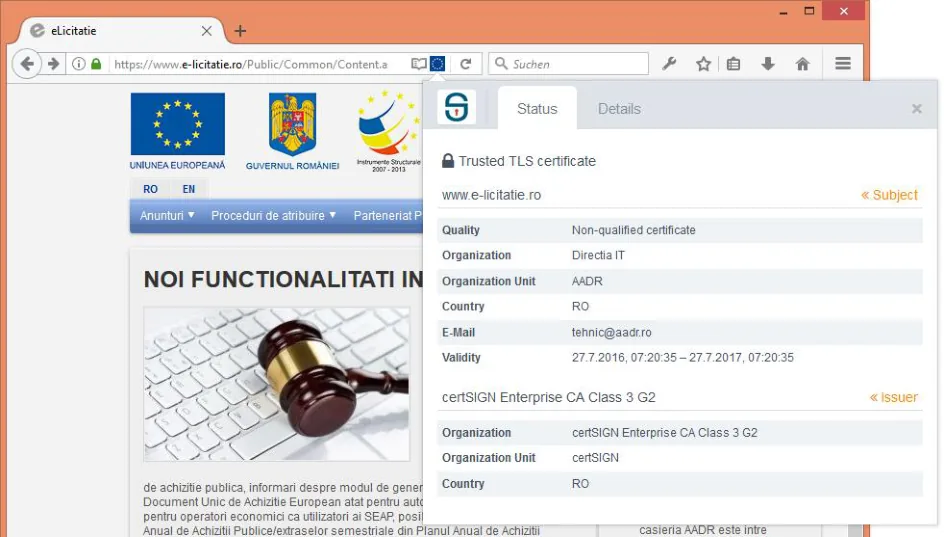
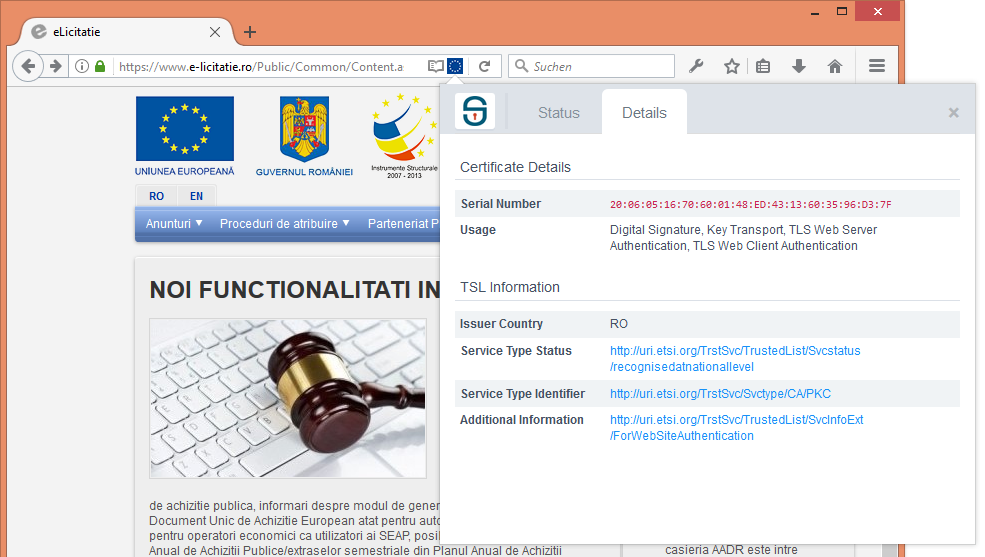
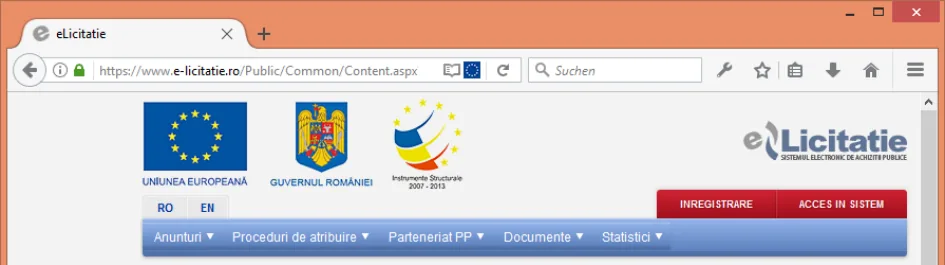
The screenshot in Figure 2 shows how the demonstrator depicts a server certificate that can be validated against the EU Trusted Lists. In that particular case, the Romanian website https://www.e- icitatie.ro uses a trust service provider recognised at national level and included in the Romanian Trusted List.
The green lock on the left side of the location bar indicates the trust status according to the browser vendor, the blue EU flag on the right side of the location highlights the trustworthiness based on the eIDAS Trust Service.
Figure 2. Screenshot showing the blue EU flag on the trusted website https://www.e-licitatie.ro
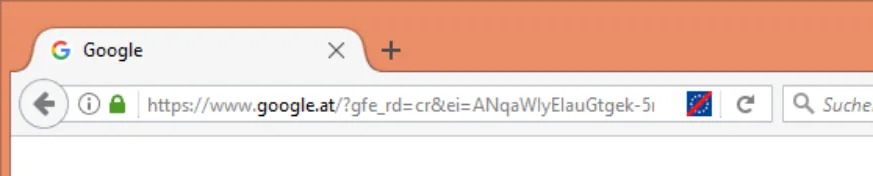
To give a counter-example, if a certificate cannot be validated against the EU Trusted List, the browser may still trust the site (green lock), but the EU flag crossed out indicates “not based on the eIDAS trust model for Website authentication certificates”.
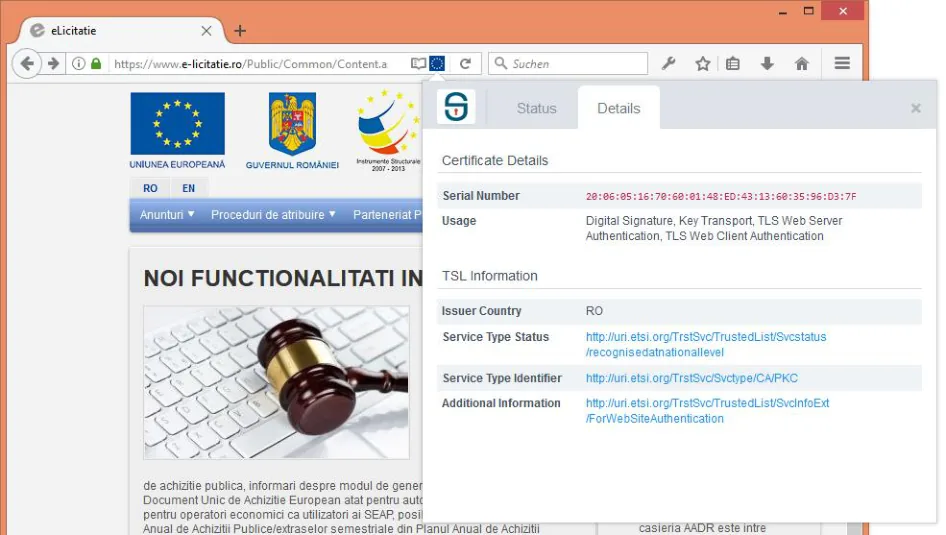
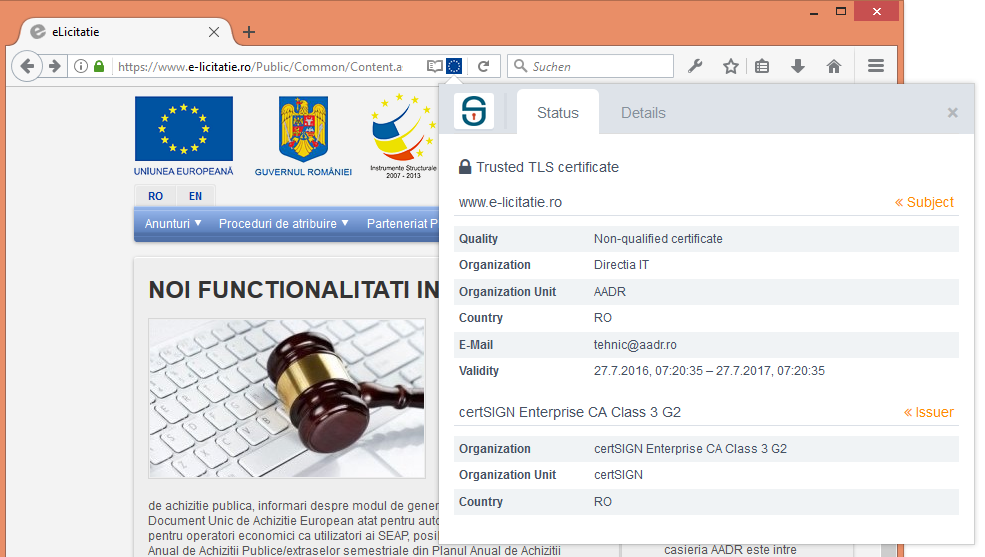
Figure 3. Striked out EU flag on untrusted website (e.g. https://www.google.at) Continuing with the first example „eLicitatie“, by clicking on the flag the tool shows some more information on the certificate that are delivered from the Trust List. The trust status is printed again in an explicit manner, followed by the subject it refers to. The subsequent overview points out noteworthy information about the certificate, e.g. for who it has been issued, and whether the quality conforms to a (non-)qualified certificate according to TL. Followed by that, basic details about the issuer are displayed.