

In order to be able to display personalized offers to website users, ad networks must recognize users beyond the context of individual web pages and sessions. However, some of the methods used for identification, such as cookies, can be disabled through browser settings or browser extensions. Therefore, ad networks are looking for different ways to identify users. This study aims to provide an overview of which methods are used to track users by recognizing unique characteristics about the utilised browser and its settings, operating system, or hardware.
1. Introduction
Many online services are provided free of charge. They are usually financed through advertising. This often relies on the tools of large ad networks. To make advertising more effective and thus increase click-through rates, these ad networks personalise the adverts they display. For this, users must remain recognisable across different websites. Cookies can be used to recognise users. Cookies are short pieces of text information stored on the device. By storing a unique ID, a user can be uniquely identified. However, the use of cookies by ad networks has drawn users’ attention to them. Users can disable cookies or delete them regularly to protect their privacy. To keep recognising users, new methods are used that replace the storage of identifying features on the device. This study gives an overview of how a user can be recognised through fingerprinting and which elements such a fingerprint can consist of.
2. Detection Methods
The detection methods can be divided into several categories. The following sections give an overview of methods that use specific browser characteristics, hardware and operating system peculiarities, and browser extensions as the basis for creating so-called fingerprints.
2.1. Browser-based Fingerprints
In a large-scale study [1], the Electronic Frontier Foundation collected fingerprints from almost half a million browser users. The fingerprint is created mainly from information that the browser makes available to the websites visited. This includes the following information:
-
User agent with information on the browser name and version
-
HTTP headers sent, with information such as accepted formats and encodings
-
Operating system in use and screen resolution
-
Configured time zone and language
-
Installed plugins (such as Flash or Silverlight) and fonts
-
Information on whether cookies or JavaScript are enabled
-
Hash of an image created with canvas or WebGL, to detect processing differences in the graphics hardware or software in use
-
Further information, such as touchscreen support or use of the Do-Not-Track HTTP header
The study found that fingerprints change over time (e.g. due to browser updates). However, users can still be tracked through regular observation. This is because usually only parts of the fingerprint change, so the link can still be established. In this way, more than 99% of users can be recognised even after a browser upgrade. The authors also revealed that extensions meant to prevent fingerprinting can in some cases even make it easier. This happens above all when only a few users use these modules. Examples are extensions that allow the user agent to be changed. If, for example, values are added or the user agent is changed manually, these changes allow a clear inference about an installed plugin or about the user. According to the authors, however, other extensions, such as NoScript, which disables JavaScript, reduce the fingerprintability of the browser. Users usually cannot detect such a side effect.
In [2], Nikiforakis et al. examine further mechanisms that allow a user to be recognised without cookies. In contrast to the previous study, this one compared the approaches of three commercial providers of fingerprinting software. In the study, conducted in 2013, most of the providers used the Flash plugin to access system-specific information. Many of the Flash methods returned more precise information than their browser equivalents. For example, they returned not only the operating system in use but also details such as the kernel version or the number of monitors in use. In the meantime, however, Flash and other browser plugins are hardly used any more, and support for Flash is to be discontinued by 2020 [3]. Other fingerprinting methods used at the time are still practicable today, however. For instance, browsers differ in their support for certain functions, some of them experimental. The list of installed fonts is also used for recognition. However, this list cannot be determined through the browser itself. The installed fonts can only be retrieved directly through plugins such as Flash or Java WebStart. Yet even if no such plugin is used any more, installed fonts can in many cases be detected by trial and error. One of the providers examined already used this approach in 2013. For this, an element containing text and invisible to the user is created on the displayed web page. The text is first displayed in a default font, and the size of the element is then stored. Next, the font of the text is changed repeatedly, and the size of the element is measured after each change. If the size differs from the initial size, the font is installed. If the size does not differ, it is assumed that the font is not installed and the browser falls back to the default font. The trackers examined also used other information accessible via JavaScript, such as the time zone or supported MIME types. Further techniques, such as detecting HTTP proxies with Flash or special ActiveX plugins, are not discussed further here, as modern browsers no longer support such extensions.
2.2. Hardware/Operating System Fingerprints
Cao et al. [4] present methods that can identify a system on the basis of hardware or operating system peculiarities. This means that a user can also be tracked across different browsers. In the study, various tasks are executed on the graphics unit using WebGL. Due to differences in the hardware or drivers used, rendered images and videos differ at pixel level. For some tasks the differences amount to only a few pixels. Even so, by combining different rendering tasks and comparing the differences, a unique fingerprint can be assigned to the system with high probability. In addition, the Web Audio API can also be used to create a fingerprint. Detectable differences between systems also occur when audio information is processed. The API also allows explicit access to information about the audio device in use, such as the maximum supported sample rate or the number of supported channels. These values can differ depending on the hardware. In addition, the number of logical CPU cores, which can be retrieved via the Web Workers API, can serve as a further indicator for the fingerprint.
2.3. Fingerprinting of Browser Extensions
Starov and Nikiforakis [5] found that installed browser extensions can also be used as a fingerprint. Most browsers do not allow direct access to the list of installed extensions. Nevertheless, the researchers were able to attribute changes made to the displayed web page to the installed plugins. However, not every extension makes changes to a web page, so this method cannot achieve complete detection. Of the 10,000 most popular plugins at the time of the study, 9.2% make changes on every web page, while 16.6% of the extensions make changes only on specific web pages.
In [6], Sanchez-Rola et al. showed that the installed extension modules in many popular browsers can be detected by further methods. In Chromium-based browsers (such as Chrome and Opera), they found that accessing an extension’s resources takes a different amount of time depending on whether the extension is installed or not. As there is only a limited number of different extensions, all publicly known plugins can thus be discovered by trial and error. To prevent this enumeration of installed extensions, the Safari browser uses randomised URIs. However, the study also found that about 40% of the plugins tested reveal this randomised URI to websites. Once this URI is known, it can be used to uniquely identify a user. This is because the randomised part is generated at random when the extension is installed and is not changed afterwards.
In [7], Gulyás et al. evaluate how accurately users can be recognised on the basis of their installed browser plugins and active website logins. For this, they use approximately 13,000 extensions to detect about 28% of all extensions available in the Google Chrome Store. Furthermore, they were able to detect active logins on about 60 websites. The study shows that about 55% of users who use a browser extension can be uniquely recognised on this basis. Moreover, the researchers state that almost 54% of users with at least one extension can be recognised through a subset of 485 plugins, which allows users to be identified quickly. Combined with the detected logins, more than 89% of users with at least one detected extension and one detected login can be uniquely identified.
3. Countermeasures
A wide range of strategies has been developed to restrict the possibility of browser fingerprinting. A seemingly simple and obvious strategy is to alter this unique fingerprint. This can be done, for example, by replacing the relevant information with predefined or randomised values. However, as already mentioned in Section 2.1, such an approach can even increase the possibility of recognising a browser. This happens because the combination of altered values is even rarer than the default settings and therefore makes attribution easier. Changing individual parameters can also break the consistency between the transmitted values. For example, if the supposed operating system is changed only in the user agent, the operating system actually in use can still be determined in other ways, such as through the JavaScript property navigator.platform.
FPGuard [8] tries to determine whether, and how likely it is that, a website is attempting to create a browser fingerprint. For this purpose, nine different metrics were defined that can indicate such activities. They include, for example, repeated calls to the properties of the navigator object, programmatic access to visible or hidden canvas objects, and the number of fonts loaded via JavaScript. In a further step, FPGuard tries to alter the content of the fingerprint on suspicious pages in order to prevent the user from being identified.
The Tor Browser [9] includes various mechanisms to prevent fingerprinting or make it more difficult. For this, many values are standardised, such as the user agent or the size of the program window, which affects the reported screen resolution. Likewise, only a predefined list of fonts is shipped. Programmatic reading of canvas elements must be explicitly permitted by the user. The Tor Browser disables plugins such as Flash. Users are advised against installing further extensions beyond those already shipped, as these could potentially be used to create a fingerprint. However, if the user changes the standardised values, they stand out from the crowd more than with other browsers.
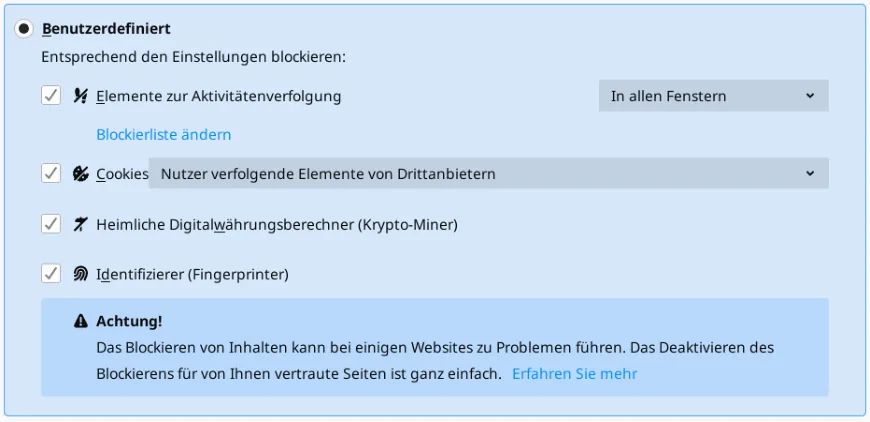
Mozilla, as a browser vendor, also offers protection against fingerprinting and activity tracking in the Firefox browser [10]. This tracking protection has been enabled by default since version 69 [11]. It blocks, for example, certain cookies used to track users. It also blocks known scripts that use the computing power of the visiting device to mine cryptocurrencies. Tracking protection can also block fingerprinters [12]. However, this function is disabled by default (as of October 2019). If the user enables protection against fingerprinters, as shown in Figure 1, the browser prevents requests to load known fingerprinting elements. However, enabling tracking protection can cause problems on websites and only protects against known tracking technologies.
Typing behaviour and mouse movements can be determined by measuring time differences with JavaScript methods such as performance.now(). As these data differ between individual users, they can also be used to recognise users. This also makes it possible to read URLs entered in other browser windows. To make such methods harder to apply, the resolution of the relevant time measurements has been reduced to 5µs in all widely used browsers [13]. Only the Tor Browser uses an even more conservative value of 100ms [14]. However, [15] demonstrates that these restrictions can be circumvented by implementing an independent time measurement. The authors recommend a comprehensive permission model in the browser to secure the interfaces needed for such attacks, as the relevant JavaScript methods can also be embedded in advertising.
Browser extensions in the form of ad blockers are used to prevent advertising-based tracking. Websites financed by advertising have an interest in detecting the use of such plugins. Visitors are often denied the content of a website to make them switch off the ad blocker. This race between ad blockers and anti-ad-blocker scripts is discussed in [16]. It describes how websites are visited with and without an ad blocker in order to identify different code paths in the JavaScript code. Based on these differences, new detection methods for ad blockers can be identified, and the presence of such extensions can be concealed by means of JavaScript rewriting.
4. Conclusion
This study has presented a wide range of ways to create a fingerprint of browsers. These can also be used, independently of cookies, to recognise the browser and its users. They range from aggregating various pieces of information provided by the browser, through detecting various settings and installed extensions, to recognising browser, operating system and hardware peculiarities, such as through canvas fingerprinting. In addition, the study examined countermeasures that browser vendors, or experienced users in the form of extensions, can use to prevent fingerprinting or at least make it more difficult. It also highlighted the paradox that some countermeasures that seem sensible at first glance can in fact increase fingerprintability.
References
[1] P. Eckersley, “How Unique Is Your Web Browser?,” 2010.
[2] N. Nikiforakis, A. Kapravelos, W. Joosen, C. Kruegel, F. Piessens and G. Vigna, “Cookieless Monster: Exploring the Ecosystem of Web-based Device Fingerprinting,” in IEEE Symposium on Security and Privacy, 2013.
[3] Adobe Corporate Communications, “Flash & The Future of Interactive Content,” Adobe, 25 7 2017. [Online]. Available: https://theblog.adobe.com/adobe-flash-update/. [Accessed 23 7 2019].
[4] Y. Cao, S. Li and E. Wijmans, “(Cross-)Browser Fingerprinting via OS and Hardware Level Features,” in NDSS Symposium, San Diego, 2017.
[5] O. Starov and N. Nikiforakis, “XHOUND: Quantifying the Fingerprintability of Browser Extensions,” in IEEE Symposium on Security and Privacy, San Jose, 2017.
[6] I. Sanchez-Rola, I. Santos and D. Balzarotti, “Extension Breakdown: Security Analysis of Browsers Extension Resources Control Policies,” in USENIX, 2017.
[7] G. G. Gulyás, D. F. Somé, N. Bielova and C. Castelluccia, “To Extend or not to Extend: On the Uniqueness of Browser Extensions and Web Logins,” in Proceedings of the 2018 Workshop on Privacy in the Electronic Society, Toronto, Canada, 2018.
[8] A. FaizKhademi, M. Zulkernine and K. Weldemariam, “FPGuard: Detection and Prevention of Browser Fingerprinting,” in IFIP Annual Conference on Data and Applications Security and Privacy, 2015.
[9] The Tor Project, “Tor Project | Anonymity Online,” [Online]. Available: https://www.torproject.org/. [Accessed 07 08 2019].
[10] G. Kontaxis and M. Chew, “Tracking Protection in Firefox For Privacy and Performance,” in Web 2.0 Security & Privacy, 2015.
[11] M. Wood, “Today’s Firefox Blocks Third-Party Tracking Cookies and Cryptomining by Default,” Mozilla Corporation, 3 9 2019. [Online]. Available: https://blog.mozilla.org/blog/2019/09/03/todays-firefox-blocks-third-party-tracking-cookiesand-cryptomining-by-default/. [Accessed 16 10 2019].
[12] “Lösche deinen digitalen Fingerabdruck und hindere Werbeunternehmen daran, dir durchs Web zu folgen,” Mozilla Corporation, 21 5 2019. [Online]. Available: https://blog.mozilla.org/firefox/de/loesche-deinen-digitalen-fingerabdruck-in-firefox/. [Accessed 16 10 2019].
[13] I. Grigorik, J. Simonsen and J. Mann, “High Resolution Time Level 2,” [Online]. Available: https://www.w3.org/TR/hr-time-2/#clock-resolution. [Accessed 25 10 2019].
[14] M. Perry, “Bug 1517: Reduce precision of time for Javascript,” [Online]. Available: https://gitweb.torproject.org/user/mikeperry/tor-browser.git/commit/?h=bug1517. [Accessed 25 10 2019].
[15] M. Lipp, D. Gruss, M. Schwarz, D. Bidner, C. Maurice and S. Mangard, “Practical Keystroke Timing Attacks in Sandboxed JavaScript,” in Computer Security – ESORICS 2017, Cham, Springer International Publishing, 2017, pp. 191–209.
[16] S. Zhu, X. Hu, Z. Qian, Z. Shafiq and H. Yin, “Measuring and Disrupting Anti-Adblockers Using Differential Execution Analysis,” 2018.
[17] M. Schwarz, F. Lackner and D. Gruss, “JavaScript Template Attacks: Automatically Inferring Host Information for Targeted Exploits,” in Network and Distributed Systems Security (NDSS) Symposium, San Diego, 2019.