
Push Notifications are key components for mobile application developers used to alert their users of important updates and reengage their users with their application. These messages are generally sent through third party push messaging services over a TLS connection but lack end-to-end encryption between the developer server and the client. The Secure Push Notifications project aims at demonstrating the implementation of end-to-end encrypted push notifications between Developer Application Servers and Android Client devices. Keys generated on the user device and registered on the developer application server are used to encrypt push messages end-to-end. The project also demonstrates the functionality of sending sensitive push messages that remain encrypted until the user unlocks the device.
1. Introduction
Push Notifications are messages sent from application servers to mobile devices. They are displayed to the user outside of the normal user interface of the application. The notifications are used for the purpose of alerting the user about updates and reminders, even when the application itself is not running in the foreground. These messages are usually sent through third-party messaging services, such as Google’s Firebase Cloud Messaging (FCM) or Apple’s Push Notification Service. An overview of the basic architecture of such a push notifications system is shown in Figure 1. Using a central instance for push notification from all applications allows the device to save power, as the device only needs to connect to a single server. This means further that all the applications can go to sleep while not in use. For the communication between the Developer Application Server and the Push Messaging Service, and between the Messaging Service and the Client Device, TLS is used to encrypt the push message. However, the central instance still has to be trusted as it is able to access the plain text of the transmitted message. Using an end-to-end encryption (E2EE) between the application server and the client device can solve this issue.
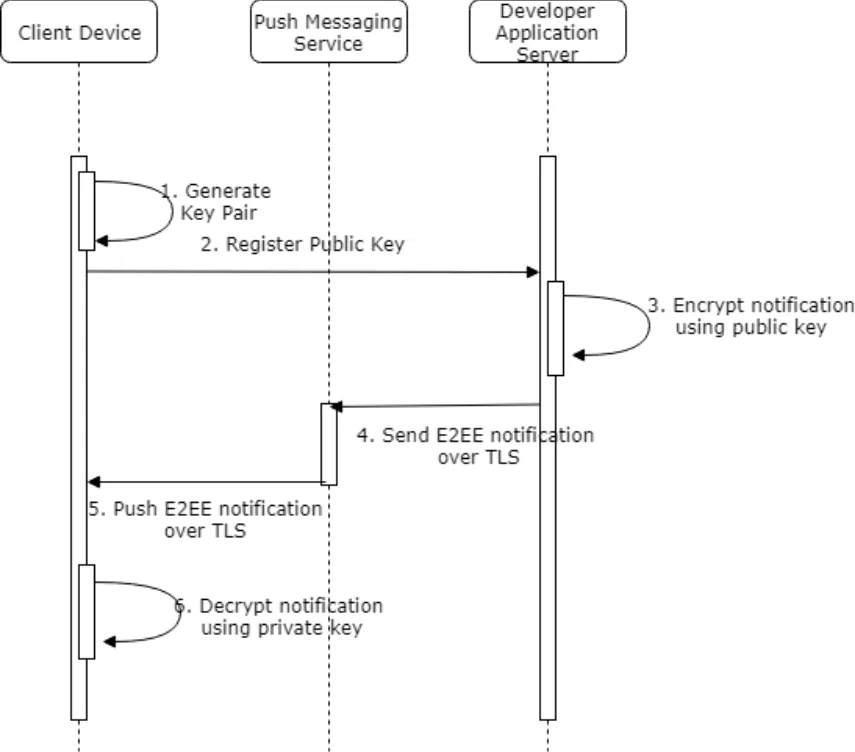
TLS (https) TLS (https) Not E2EE Application Client Device Server Figure 1 Traditional Push Notifications The Secure Push Notifications project aims at demonstrating end-to-end encrypted push notifications between Application Servers and Android devices. In order to achieve end-to-end encryption of the push messages, a key pair is first generated on some secure element of the mobile device. The public part of the key is registered on the Developer Application server and used to encrypt the push messages that the Application server sends to the client through the third party push notification service. Finally, the mobile device uses the private key of the key pair that was generated to decrypt the push notification. An overview of the E2EE push notifications process is shown in Figure 2.
2. Implementation
In this project we implement end-to-end encrypted push notifications from a Java-based Application Server to Android Clients. To facilitate this, we used the recently released Capillary Library [1], which has built-in functionalities for key management, message encryption and decryption, and also caching of encrypted messages. The library uses the secure element of the device to store the key securely. It can be used on Android version 4.4 (KitKat) and newer. The demonstrator is based on the demo code provided alongside the library.
For the server application we use the gRPC [2] library. The library supports Protocol Buffers, which is the data structure specification language used to communicate with the FCM service. Furthermore, the communication between the mobile device and our application server is also facilitated using Protocol Buffers. The server uses a sqlite database [3] to store the public key together with a unique identifier.
The application demonstrates an imaginary eGovernment application, where citizens (users) can sign up and subscribe to different eGovernment Services, for which they then receive notifications. The demonstrator does not attempt to do any authentication, as this was out of the scope for this project. In a real world scenario, the eGovernment application would rely on an already existing identity provider to identify and authenticate the user.
The main step of the demo application scenario are as follows:
- User installs the eGovernment Application from an app store.
- User logs into the application by entering a user name.
- User subscribes to an eGovernment Service and gives his/her permission to receive push notifications.
- The application server sends end-to-end encrypted notifications to the user’s device.
- If the device is already unlocked, the notification is shown to the user. Otherwise, it remains encrypted until the user authenticates himself/herself.
The details of the different workflows involved are described below:
i. During sign up, a unique user ID is generated. This user ID is sent to the application server, together with the FCM token. The FCM token is needed for the communication with the FCM service and is specific to the installation of the application on the mobile device. ii. When a user subscribes to an eGovernment service, a key pair is generated on the device, using the RSA-ECDSA algorithm. It is stored in the Android Keystore. The public key is then registered on the Application Server. iii. After subscription, the Application Server will use the public key of the user to encrypt a push message, and send it to the FCM. The FCM will then forward it to the device. iv. If the client device is unlocked while receiving the message, the device is able to use the stored private key to decrypt the push notification and show it to the user. Otherwise, the message is cached in Device Encrypted Storage (DE) until the user unlocks their device.
3. Results
In this section, we show an overview of the demonstrator application.
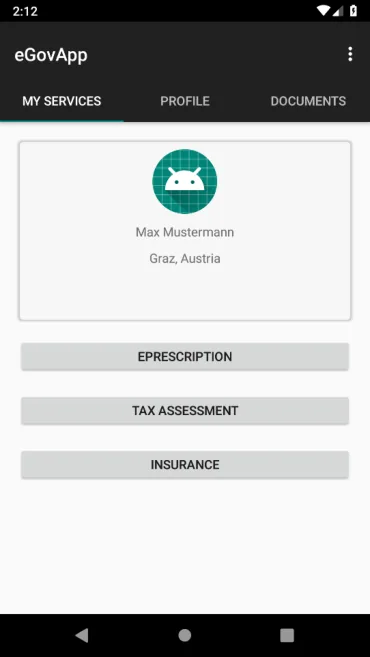
After the user logs in, they are presented with a list of available eGovernment Services that can be subscribed to, as seen in Figure 3.
Figure 3 The Main Activity of the application, containing some sample services
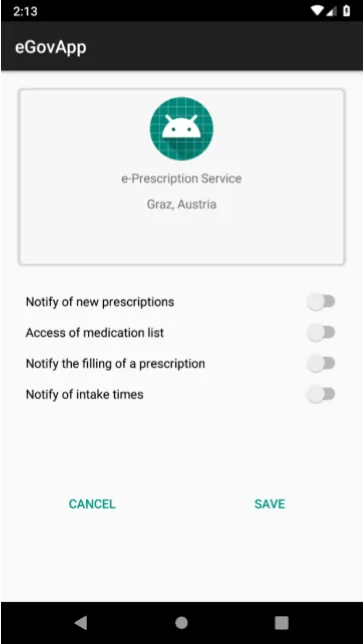
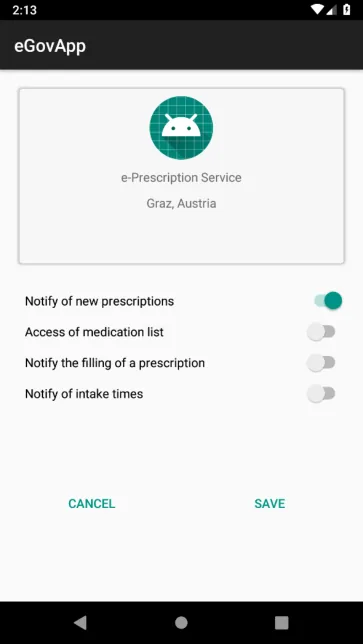
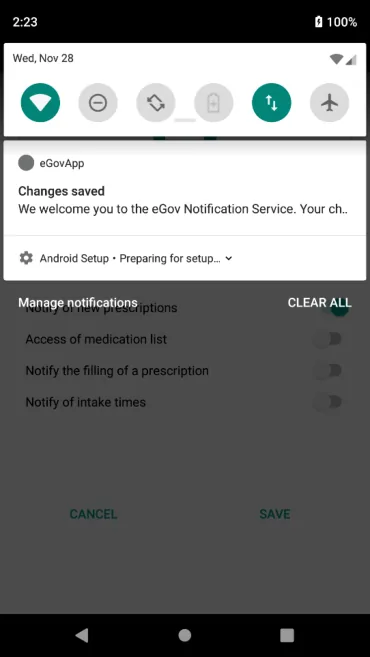
After the user selects the Service he/she would like to register for, the service presents different types of notifications which the user can subscribe to. An example of such a notification selection can be found in Figure 4. After choosing the types of notifications they want to receive, as seen in Figure 5, the user clicks on “Save” to update their preferences. Once the button has been pressed, the demonstrator applications registers the changes to the Application Server.
4. Conclusion
The Secure Push Notifications project demonstrated end-to-end encrypted push messages sent from an application server to Android clients. The concept of generating a device-specific key pair and using them to encrypt push messages end-to-end is equally applicable to other mobile platforms (such as iOS using the Apple Push Notification Service). This demonstrator used FCM as the thirdparty messaging service, but the library involved could also be used with other push messaging services. From the user experience perspective, the only difference to the current push notification mechanisms is that encrypted notifications are not shown to the user until the device is unlocked. The demo application showcased one possible usage of secure push messages for an eGovernment mobile application. Such an approach could also be leveraged to distribute one-time passcodes (OTP) as a more secure alternative to SMS.
5. References
[1] [Online]. Available: https://github.com/google/capillary.
[2] [Online]. Available: https://grpc.io/.
[3] [Online]. Available: https://www.sqlite.org/index.html.