The programming interface of Android offers a variety of features and information sources to create applications. However, these information sources also make it possible to create a fingerprint of a device. However, applications do not always need access to all the information provided. One approach for making it more difficult to create a fingerprint is to deactivate certain information sources by making changes to the runtime environment or to standardize their return values across as many devices as possible. This report examines the influence of such changes to the runtime environment on applications on Android. For this purpose, tests are carried out using a tool that automatically triggers user input while the applications to be tested are running. Using this approach, the changes to the runtime environment are examined with the 120 most popular applications from the Google Play Store. The tests showed that the majority of the tested applications continue to run. However, changes to methods that are relevant to the user interface can result in minor visual differences.
1. Introduction
Mobile applications provide a wide range of services and functions, often at no (direct) cost to users. To generate revenue with these free applications, developers frequently depend on personalised advertising [1]. To deliver targeted advertising, mobile applications collect personal information from the devices on which they run [2]. This allows them to track their users across different applications. This practice enables application developers to offer their services free of charge, but it considerably impairs the privacy of users. To counter this and to protect users’ privacy, several protection mechanisms have been integrated into Android over the years. For example, Android 6 reworked the permission system to give users control over access to data sources that are considered sensitive under data protection law, such as contacts or photos. These so-called dangerous permissions require the user’s explicit consent before an application can access the data they protect. Over the years, further permissions have been added, and some existing ones have been moved to the “dangerous” level. In addition, Android 10 restricted access to non-resettable user identifiers for third-party applications [3]. Conversely, applications are encouraged to use a resettable identifier such as Google’s advertising ID. Despite these attempts by operating system vendors to restrict access to personal data, applications still collect data about the devices on which they run, and some are even starting to do so [4]. In particular, applications can still combine user-specific and device-specific information to create a fingerprint that can be used as a substitute for a unique identifier [5].
To reduce the fingerprintability of Android, a tool was developed that can automatically generate patches for the operating system’s programming interface. These patches change the return values of methods and the contents of fields and content providers that contain fingerprintable information. The patches are bundled into a patch package and can thus be applied to individual applications. In this report, such a patch package is created and then applied to various popular applications. The report examines how the changes to the programming interface affect the applications. It also examines how many of the fingerprintable information sources found could be patched automatically and which information sources had to be excluded from patching because of incompatibilities with applications.
2. Background
This section provides important background information on the main approaches to patching applications. It then presents related work on protection against browser fingerprinting.
2.1. Application patching
To reduce the fingerprintability of the Android programming interface by changing the information it provides, either the runtime environment or the application package must be modified. In particular, it must be possible to change the methods, fields and content providers that are accessible via the API. There are various approaches to achieve this goal. Some of them rely on making changes to the system, either by obtaining root privileges or by providing a modified system image. There are several solutions for applying patches to the system, such as LSPosed [1] or Magisk modules [2]. However, modifying the system affects the entire device, not just individual applications, and thus increases the device’s vulnerability to attacks. Alternatively, applications can be run inside a container application, such as VirtualApp [3]. This concept allows the container application to make changes to the application without requiring changes to the system. With this approach 1 https://github.com/LSPosed/LSPosed 2 https://github.com/topjohnwu/Magisk 3 https://github.com/asLody/VirtualApp however, the container application must request in advance all the permissions that an application might need. The container resides in the same process as the application, so it is generally unable to prevent the application from using a permission that was requested in advance. Moreover, with this approach some operating system integrations will no longer work, and the signature of the application package reported by the system is altered.
Finally, changes can be made directly to the application package. With this approach, the executable program code and the resources contained in the package can be modified. To install the modified package on a device, it must be repackaged and re-signed, which also invalidates all signature checks, similar to running inside a container application. What all three approaches have in common is that they can generally be detected by means of remote attestation, by checking either the application’s signature or the state of the bootloader [6]. We chose the A2P2 patching pipeline [7] to patch the application package directly. This approach allows us to create application-independent patches that can be applied to individual application packages. Because they are applied to the application package, no changes to the system are required, which avoids undesirable side effects on the system and on other applications. In addition, the patches can be modified or disabled for individual application packages if required.
2.2. Related work
There is little work in the literature on protecting mobile operating systems against fingerprinting. In the context of web browsers, however, several approaches to protection against fingerprinting have been proposed. FPGuard [8], for example, monitors the API calls of websites and uses heuristics to detect fingerprinting attempts. When the browser extension detects fingerprinting activity, it alters the information returned to the website in order to thwart the fingerprinting attempt. PriVaricator [9] uses various randomisation techniques to alter the information that websites can retrieve. Similarly, the FP-Block extension also randomly alters the data provided by information sources that are suitable for fingerprinting. The main difference is that the information is randomised only across different domains in order to reduce problems. In [10], a browser extension called JShelter was presented. The extension aims to reduce fingerprintability by changing the JavaScript programming interface of browsers. In particular, the extension restricts or alters certain methods and properties and is able to simulate certain sensors. These methods and properties normally make it possible to retrieve information about the device used, the browser instance or the environment. Similarly, both the Tor Browser [11] and Firefox [12] have taken measures to counter fingerprinting. These measures include changing the values reported by certain information sources and disabling certain functions.
3. Generated patches
3.1. Methods and fields
A summary of the fingerprintable methods and fields found, and of the patches generated for them, can be found in Table 1. In total, 598 methods and 85 fields that provide fingerprintable information were found. Of these, 33 methods and 9 fields could not be patched because the corresponding class was not part of the public Android API. In addition, 5 methods could not be patched because the return type is obfuscated. For all methods that declare exceptions in their signature, the corresponding class could be resolved. However, 15 methods could not be called and 4 fields could not be retrieved on the reference device. Patches were therefore created automatically for a total of 544 methods and 72 fields. In addition, reference values based on values obtained from other devices could be defined manually for 10 of the 16 methods. 8 of the methods and 1 field had to be added to the blocklist because they had a negative effect on certain applications. In total, therefore, 546 methods and 71 fields were patched.
Of the 546 patched methods, 446 are instance methods from 117 different classes. Of these, 379 methods are part of the public API and could therefore be patched directly using A2P2’s patch methods. For the remaining 67 hidden methods, a patch for the reflection API had to be created in order to redirect calls to the respective patched version of the method. In addition, patches were created for 108 static methods in 61 classes. 77 of the static methods are publicly accessible, while the remaining 31 methods are hidden. In total, patches were created for 448 public and 98 hidden methods. Of the 71 patched fields in total, 43 are non-static fields from 13 classes. The other 28 fields are static and are changed in 6 different classes. Because the fields are set either at application start or at object creation using the reflection API, no distinction is made between public and hidden fields.
Table 1 Overview of the methods and fields identified as fingerprintable, and of the patches created for them.
| Col1 | METHODS | FIELDS | TOTAL |
|---|---|---|---|
| # Fingerprintable methods and fields identified | 598 | 85 | 683 |
| - Corresponding class could not be found on the reference device | 33 | 9 | 42 |
| - (Return) type does not exist | 5 | 0 | 5 |
| - Exception type does not exist | 0 | 0 | 0 |
| - No reference value available | 15 | 4 | 19 |
| = Automatically created patches | 544 | 72 | 616 |
| + Manually defined reference values | 10 | 0 | 10 |
| - Methods that had to be added to the blocklist | 8 | 1 | 9 |
| = Patches created | 546 | 71 | 617 |
| 91,5% | 83,5% | 90,5% |
3.2. Blocklist
Some methods and fields had to be put on the blocklist. Specifically, eight methods and one field were put on the blocklist because they caused problems in a number of applications. For example, changing the value of the non-static field uiMode in the class android.content.res.Configuration caused severe flickering of the user interface, which made the affected applications unusable. On smartphones, this field can be used to determine whether night mode is switched on. It can also be used to detect whether the application is running on a television or a VRR headset, for example. In addition, the methods getAllNetworks() and getActiveNetwork() of the ConnectivityManager were added to the blocklist. These methods make it possible to query all available networks or the active network, respectively. Patching these methods, however, led to connectivity problems in some applications. The method getConfiguration() of the class android.content.res.Resources was put on the blocklist because unpacking an old configuration object caused problems in some applications. Nevertheless, our framework was able to create patches for some of the methods and fields within the class Configuration. In addition, the method getText() of the class android.widget.TextView was put on the blocklist because it caused applications to retrieve incorrect text from text views. In the class android.hardware.display.DisplayManager, the method getDisplays() was added to the blocklist because the return value could not be deserialised correctly, which resulted in an empty array being returned. This problem was identified during our effectiveness tests because the return value differed from that of the reference device. It also caused a problem in one application, as that application expected at least one display to be returned. This led to the application crashing with an ArrayIndexOutOfBoundsException. In addition, two methods in the android.view.WindowManager class were added to the blocklist. Specifically, the methods getCurrentWindowMetrics() and getMaximumWindowMetrics() were put on the blocklist because the parameter windowInsets is null in the collected reference values. In the compatibility tests, this led to a crash with a NullPointerException in five applications. Finally, we also excluded getCallingUid() of android.os.Binder, as it could cause problems with certain security checks.
3.3. Content providers
In total, five content providers that supply fingerprintable information were found. All of them were patched successfully. Our reference database therefore contains one table for each of the five discovered content providers. In total, the reference database contains 441 entries. By far the most fingerprinting entries were found in the settings content providers. Besides a few constants, these providers mainly contain system settings that can be adjusted by the user of the device. The settings provider is divided into three sub-providers. Specifically, these are settings/global, settings/secure and settings/system. The reference table for the content provider settings/global contains 221 entries. It contains, for example, the device name, which the user can choose freely, the boot count and the mobile network settings. For the provider settings/secure, the reference table contains 130 different entries. These include, among other things, the settings for accessibility, the input method and the autofill service, as well as the settings for the lock screen. Finally, the provider settings/system contains 47 entries. This provider primarily contains information about media and notification settings, including, for example, configured notification tones or vibration settings. The provider media/internal/audio/media contains information about ringtones, notification sounds and alarm tones. The reference table obtained from our test device contains 42 different entries. Besides various data about the sounds, this table also contains a column “date_modified”. On unpatched devices, for the preinstalled sounds this column corresponds to the time of the device’s first boot. Finally, the provider service-state contains information about the mobile network, such as the type of data network or the network operator’s number. Because a single SIM card was installed in our reference device, this provider contains one entry.
4. Experiments
Because our approach changes the runtime environment of applications, we evaluate compatibility by testing it with popular applications. The compatibility tests were carried out on a Google Pixel 7a running Android 14 with security patches dated 5 January 2024. In particular, the tests were carried out with the six most popular applications from each of 21 different categories. One of the applications was available only for Android TV-based devices, which made it incompatible with our test device. A further five applications were listed in two categories, so that a total of 120 different applications were available for the tests. To prepare the test environment, the Android Debug Bridge (adb) was used to install the patched application automatically. In addition, the UI/Application Exerciser Monkey 1 was used to start the application and to automatically execute events such as touches or swipe gestures in the running application. The default distribution of events was not changed, because, as shown in [13], a modification would not lead to higher coverage. An exception is the system key events. These were disabled because they include keys such as the home or call key, which either move the application under test to the background or start the telephone application. In addition, a wait time of 200 milliseconds between events was selected. Although according to [13] this wait time does not increase coverage, it makes it easier for the tester to inspect the application visually by hand. While the Application Monkey detects crashes of the examined application by monitoring the system log for unhandled exceptions, it cannot automatically detect changes to the program flow or errors displayed during execution. In the following investigations, these are detected by manually inspecting the automatically running tests visually.
The applications are compared in three different configurations. First, the applications were run without any changes in order to identify any incompatibilities with the test device. Then the A2P2 patching pipeline was used to re-sign the application. In this test, no additional patches were applied, i.e. an empty patch package is used. This makes it possible to detect problems that may occur when the applications are repackaged with a different signing certificate. Finally, the complete patch package was applied. To make the tests comparable across the three test cases, a fixed initial value (seed) was set for the Application Monkey. As a result, the same sequence of events is sent to the application in every test case.
Table 2 Overview of the results of the application tests.
| Col1 | NUMBER |
|---|---|
| Possible total number (6 applications * 21 categories) | 126 |
| - Number of applications that appear in several categories | 6 |
| = Number of applications to be tested | 120 |
| - Applications that cannot be patched | 2 |
| - Execution problems even in the unmodified state | 3 |
| = Potentially runnable applications | 115 |
| - Crash with exception | 7 |
| - Other execution problems (e.g. error message at application start) | 8 |
| = Remaining patchable applications | 100 |
| - Crash with exception | 3 |
| = RUNNABLE PATCHED APPLICATIONS | 97 |
An overview of the results of the application tests can be seen in Table 2. Two of the 120 applications could not be patched because the patching framework could not re-sign the patched application package. The remaining 118 were patched and installed successfully. However, three applications already showed problems when run unmodified. Two of them closed on the loading screen, while in one application a dialogue window appeared stating that critical application data was missing and that the application had to be reinstalled.
Of the remaining 115 applications, a total of seven crashed with an exception when patched with an empty patch package. Four of them crashed because of an IncompatibleClassChangeError. Although some applications were obfuscated, comparing the stack traces showed that all of them crashed at the same line in the DrawScope class of Android’s Compose UI framework. The remaining three applications were aborted because of failed signature checks. During the tests, eight further applications were terminated prematurely. Two of these applications displayed an error message indicating that a file was corrupt and that the application had to be reinstalled. The remaining six applications were closed without an error message being displayed or an exception being thrown.
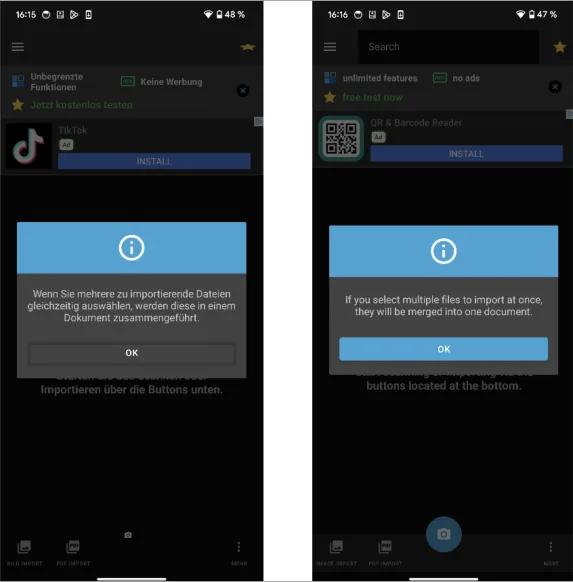
Of the remaining 100 applications that are compatible with our test device and A2P2, three terminated at runtime when patched with the complete patch package. In particular, one of these applications crashed in native program code. The other two applications were unable to access the resources stored in the application package. In addition, two applications experienced network connectivity problems during the tests. Furthermore, patches were generated for some user interface classes in the API, which led to visual differences in some user interface elements compared with the empty patch package. For example, some buttons had a different background colour, while switches had a different size. Despite these differences, all tested user interface elements remained fully functional when operated. An example of a difference between an unpatched and a patched application can be seen in Figure 1.
5. Conclusion
This report examined the influence of changes to the runtime environment on applications on Android. For this purpose, tests were carried out using the UI/Application Exerciser Monkey. It triggered user input automatically on the applications under test. With the help of the Monkey, the effects of the changes to the runtime environment aimed at reducing fingerprintability were examined with the 120 most popular applications from the Google Play Store. The investigation showed that the majority of the tested applications continue to run. However, changes to methods that are responsible for the user interface led to differences in the display of various user interface elements. These elements remained usable, though.
References
[1] Statista, „Most popular app monetization methods by publishers from the United States as of December 2023,“ Statista, 2023. [Online]. Available: https://www.statista.com/statistics/1119916/app-monetization-methods-united-states-apppublishers/. [Zugriff am 26 02 2024].
[2] A. Razaghpanah, R. Nithyanand, N. Vallina-Rodriguez, S. Sundaresan, M. Allman, C. Kreibich und P. Gill, „Apps, Trackers, Privacy, and Regulators: A Global Study of the Mobile,“ in 25th Annual Network and Distributed System Security Symposium, NDSS, San Diego, California, USA, 2018.
[3] Android Developers, „Privacy Changes in Android 10 - Restriction on non-resettable device identifiers,“ Google Inc., 2019. [Online]. Available: https://developer.android.com/about/versions/10/privacy/changes#non-resettable-device-ids/. [Zugriff am 28 02 2024].
[4] K. Kollnig, A. Shuba, M. V. Kleek, R. Binns und N. Shadbolt, „Goodbye Tracking? Impact of iOS App Tracking Transparency and Privacy Labels,“ in FAccT ‘22: 2022 {ACM} Conference on Fairness, Accountability, and Transparency, Seoul, Republic of Korea, 2022.
[5] W. Wu, J. Wu, Y. Wang, Z. Ling und M. Yang, „Efficient Fingerprinting-Based Android Device Identification With Zero-Permission Identifiers,“ IEEE Access, Bd. 4, pp. 8073-8083, 2016.
[6] B. Prünster, G. Palfinger und C. Kollmann, „Fides: Unleashing the Full Potential of Remote Attestationt,“ in Proceedings of the 16th International Joint Conference on e-Business and Telecommunications - SECRYPT, Prag, 2019.
[7] F. Draschbacher, „A2P2 - An Android Application Patching Pipeline Based On Generic Changesets,“ in International Conference on Availability, Reliability and Security, Benevento, Italy, 2023.
[8] A. FaizKhademi, M. Zulkernine und K. Weldemariam, „FPGuard: Detection and Prevention of Browser Fingerprinting,“ in Data and Applications Security and Privacy XXIX - 29th Annual IFIP, Fairfax, VA, USA, 2015.
[9] N. Nikiforakis, W. Joosen und B. Livshits, „PriVaricator: Deceiving Fingerprinters with Little White Lies,“ in Proceedings of the 24th International Conference on World Wide Web>, Florence, Italy, 2015.
[10] L. Polcák, M. Salon, G. Maone, R. Hranický und M. McMahon, „JShelter: Give Me My Browser Back,“ in Proceedings of the 20th International Conference on Security and Cryptography, SECRYPT, Rome, Italy, 2023.
[11] M. Perry, E. Clark, S. Murdoch und G. Koppen, „The Design and Implementation of the Tor Browser - Cross-Origin Fingerprinting Unlinkability,“ The Tor Project, Inc., 2019. [Online]. Available: https://www.torproject.org/projects/torbrowser/design/#fingerprinting-linkabilityp. [Zugriff am 28 02 2024].
[12] Mozilla Corporation, „Enhanced Tracking Protection in Firefox for desktop,“ Mozilla Corporation, 2023. [Online]. Available: https://support.mozilla.org/en-US/kb/enhanced-tracking-protectionfirefox-desktop/. [Zugriff am 27 02 2024].
[13] P. Patel, G. Srinivasan, S. Rahaman und I. Neamtiu, „On the effectiveness of random testing for Android: or how i learned to stop worrying and love the monkey,“ in Proceedings of the 13th International Workshop on Automation of Software, Gothenburg, Sweden, 2018.