The Self-Ident proof of concept investigates how reference image capture, guided portrait capture, local quality checking and face comparison can be combined in a smartphone application. The aim is to gain practical experience with integrating on-device models and custom image analysis. Passport photo criteria serve as a domain guideline for suitable captures in the self-ident context. The application is designed as a research prototype.
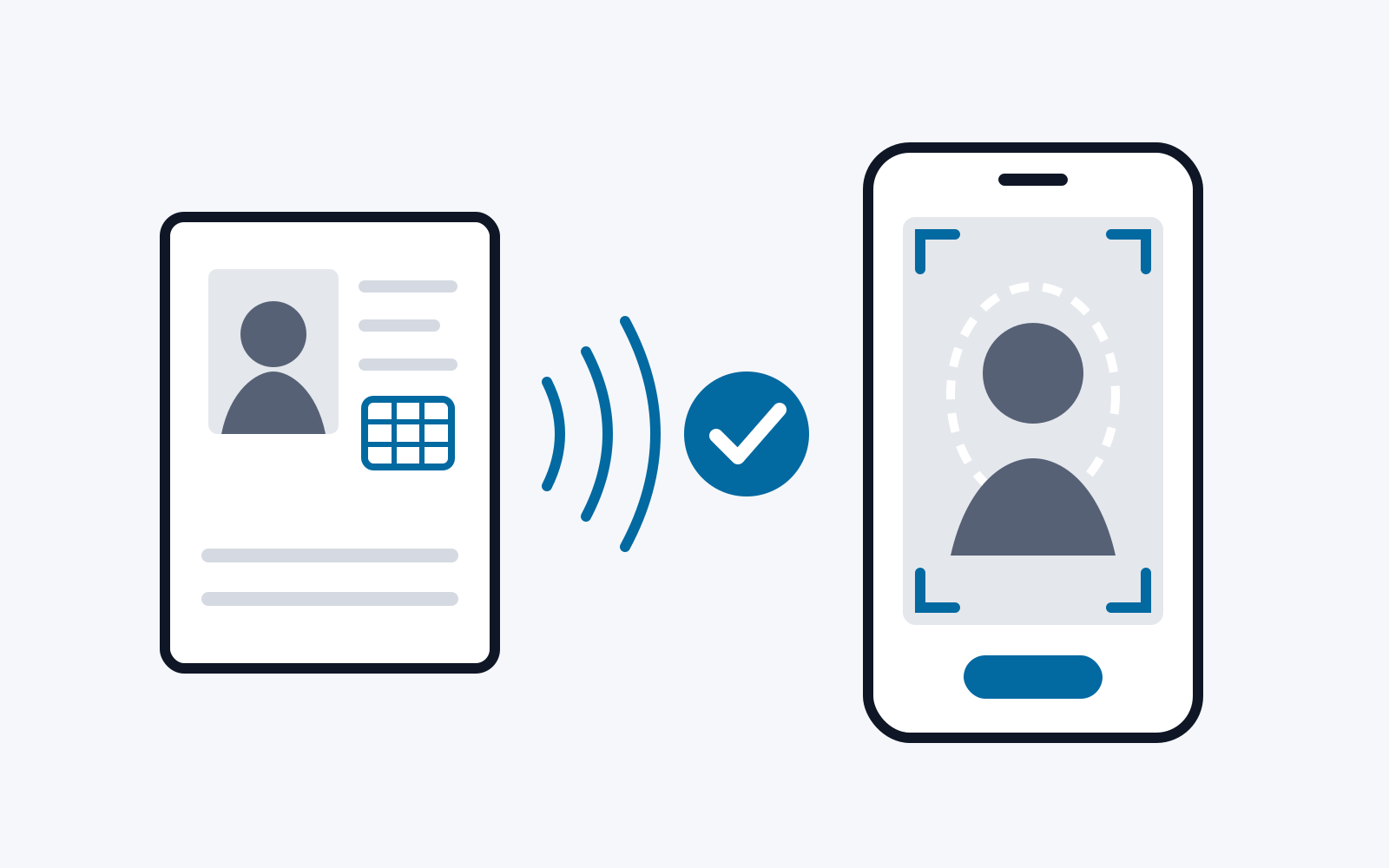
The implemented flow covers taking over a passport photo after reading a passport via NFC and capturing a reference face from a document photo. Capture instructions and feedback in the camera preview support the subsequent portrait capture. Shared quality rules evaluate the available measurements and generate concrete capture hints. The captured image is checked again and, if the starting situation is suitable, cropped automatically. In the review, the reference and captured images can be viewed and compared using selectable models, alignment methods and preprocessing steps. Raw metrics and result levels make the comparison decision visible.
The result is a technical basis for investigating local image analysis methods and how they interact in a traceable capture process. The report describes the functions implemented and classifies their technical prerequisites.
1. Introduction
Identification and application processes are increasingly moving to the smartphone. Typical steps are capturing an identity document, reading its chip and matching the document portrait against a current photo of the person. Whether this matching succeeds depends largely on the quality of the input images. Blur, a turned head or covered eyes make both visual assessment and automatic feature extraction more difficult.
The Self-Ident proof of concept investigates how these steps can be implemented entirely on the device. It focuses on three questions:
-
How can a reference portrait be captured, for example from the chip of a passport or from a document photo?
-
How can the app guide the user to a capture that comes as close as possible to recognised passport photo criteria?
-
Which locally executable models and preprocessing steps are suitable for face comparison, and how transparently can their results be presented?
The criteria of ICAO Doc 9303 and the Austrian passport photo requirements serve as a domain guideline. However, they do not turn the research prototype into a finished passport photo solution. All image analysis runs locally on the smartphone; portraits do not have to be sent to a server for this.
Chapter 2 summarises the domain requirements for portrait captures and the foundations of face comparison. Chapter 3 describes the app along the flow, from reference capture to comparison. Chapter 4 explains the technical implementation, the technologies used and the open work. Chapter 5 draws a conclusion.
2. Domain foundations and requirements
2.1. Standards and requirements for portrait captures
This section summarises the requirements relevant to capture and comparison. ICAO Doc 9303, Part 3, eighth edition 2021, with section 3.9 on portrait displays [1], and the Austrian BMI passport photo criteria [2, 16] form the frame of reference.
For digital capture, ISO/IEC 39794-5 describes the data format for face images, including recommendations for capture [13]. ISO/IEC 29794-5 specifies how the quality of a single face image can be measured by software [14].
Image format and composition: The Austrian criteria specify 35 × 45 mm. The head should take up about two thirds of the image and be at most 36 mm high. It should appear centred. The distance between the eyes is at least 8 mm [2].
Pose and gaze: The head must face forward, the gaze must be directed at the camera and both eyes must be open. Turned or tilted captures change the visible geometry [1, 2].
Expression and visibility: A neutral facial expression and a closed mouth make a comparable representation easier. Facial features and eyes must be visible. In particular, glasses must not obscure the eyes through reflections [1, 2].
Image quality and capture environment: The face should be depicted sharply, clearly and in natural colours. Even lighting and a calm, light background support recognisability [1, 2].
2.2. Local processing and face comparison
Local analysis can derive capture hints directly from the camera image. For the analysis and comparison steps considered here, the portraits therefore do not need to be sent to an analysis server. Sensitive image data remains within the local processing flow. This is a technical basis for data minimisation.
| Task | Question and result |
|---|---|
| Face detection | Where is a face, and how many faces are in the image? The result includes positions and facial landmarks. |
| Quality assessment | Which selected capture properties are sufficient? The result is a set of measurements and the hints derived from them. |
| Biometric comparison | How similar are the feature representations of two faces under a chosen pipeline? The result is a comparison value and a threshold decision. |
Table 1: Three different image analysis tasks
For the comparison, a reference portrait and a new capture are available. After detection and geometric alignment, a model generates a feature vector, a so-called embedding, from each face. A metric describes the similarity or distance. A configured threshold translates the value into a decision. This decision depends on the model, preprocessing, image material and calibration and is not proof of complete identity [8].
Local processing and the dependence of the decision on model and calibration result in two design requirements: economical processing and traceable results.
2.3. Distinction from manipulation and attack detection
A morphing image combines features of several faces. Deepfakes are synthetically generated or altered image content. In presentation attacks, the camera is shown, for example, a photo or a display instead of the person who is actually to be captured. These terms concern different test questions than sharpness or feature similarity. Neither a neutral pose nor a high comparison value is proof of liveness or of the absence of manipulation. ISO/IEC 30107-3 describes how mechanisms for presentation attack detection are to be tested and evaluated [15].
Independently of this, the origin of a reference image must be considered separately from the comparison result: an imported or photographed face does not become an authentically confirmed identity source through a comparison.
3. Description of the app
3.1. Entry and choice of reference source
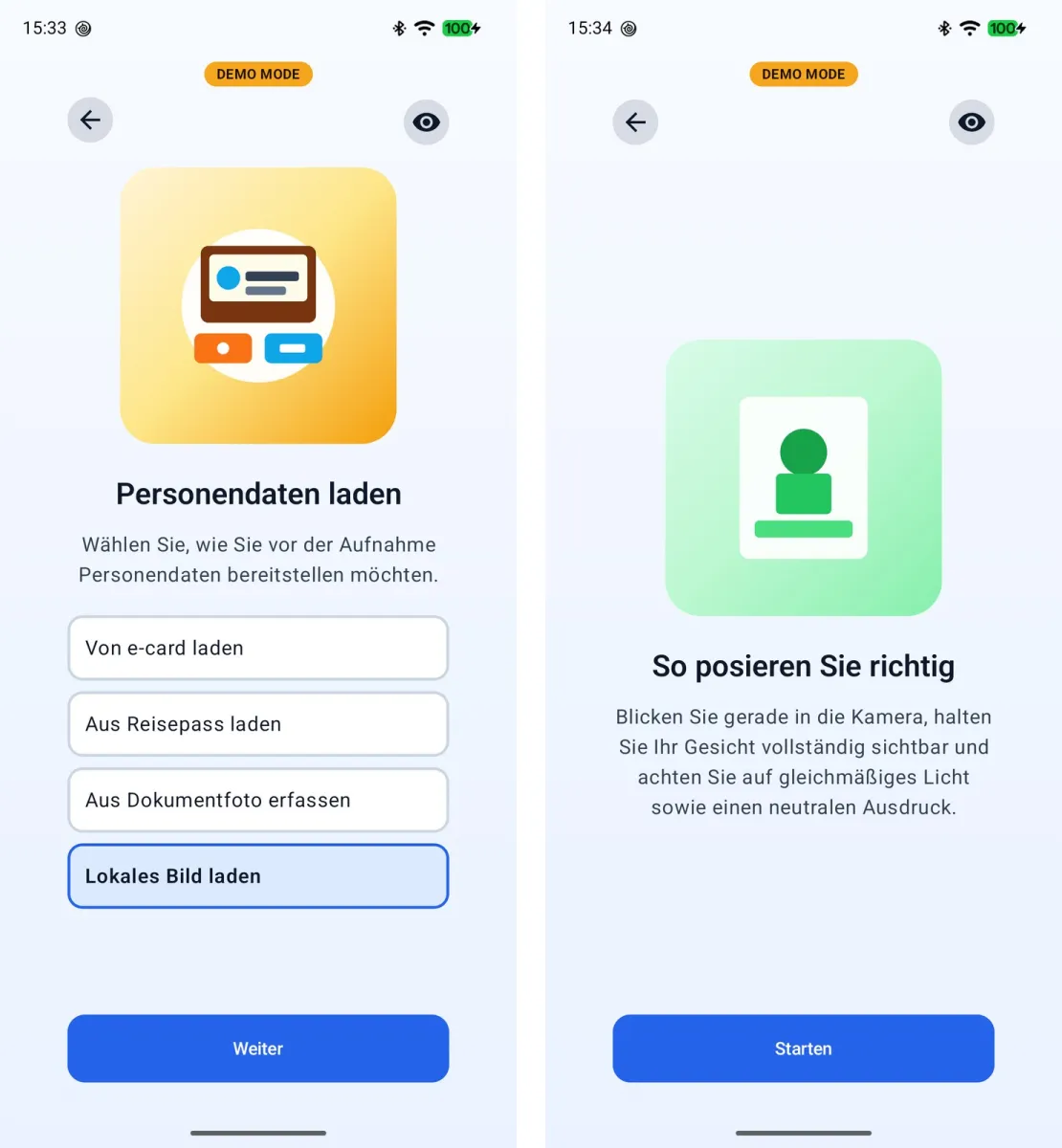
Onboarding leads to the camera permission and to the choice of capture path. The options are passport, e-card, document photo and „Lokales Bild laden“ (load local image), a flow without a previously captured reference that mainly serves testing purposes. The choice branches into different functions: passport photo takeover, photographic reference capture, prototypical card authentication or immediate capture preparation. The four paths are therefore not to be understood as equivalent reference proofs.
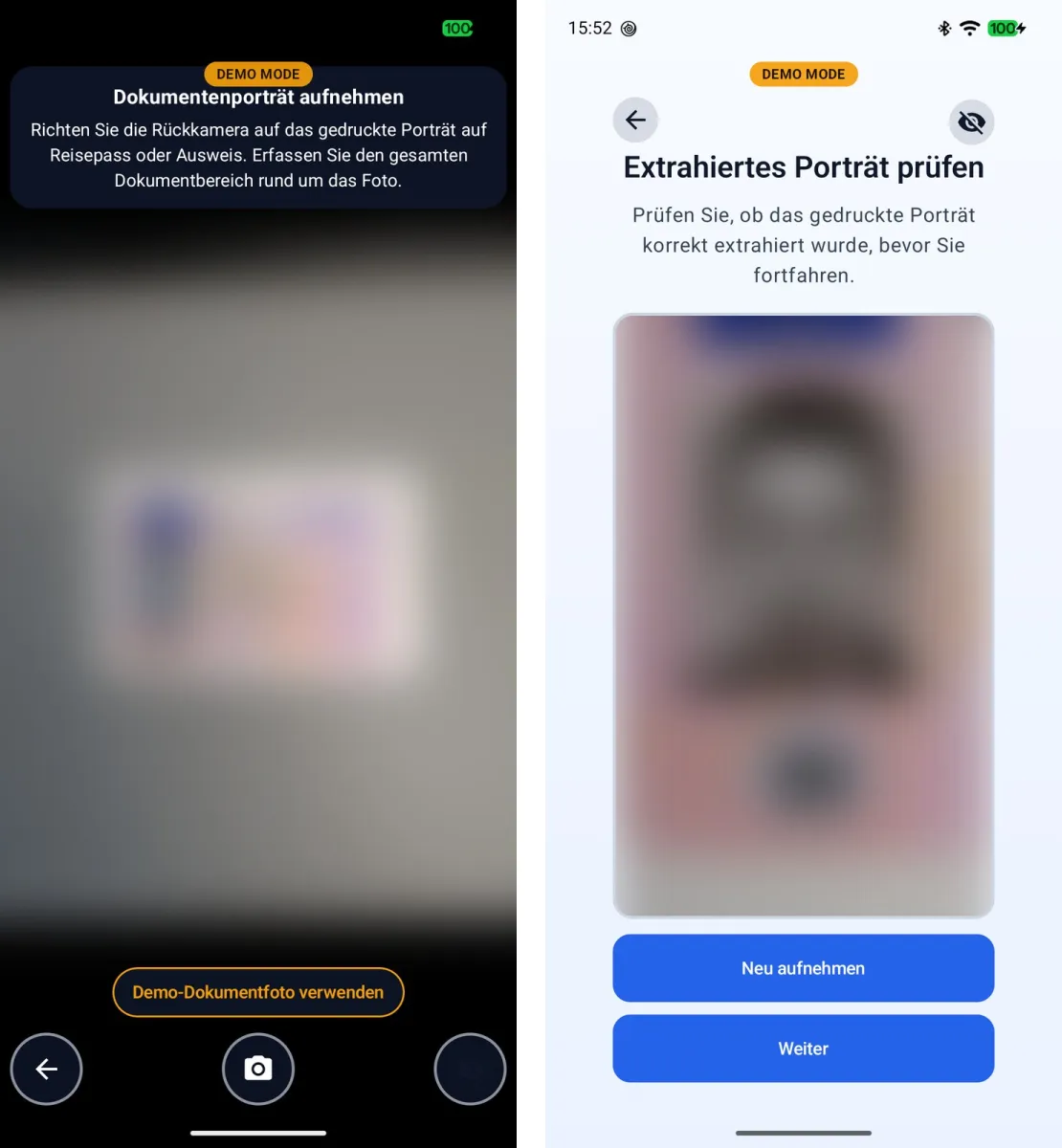
The figures in this chapter are screenshots of an Android device. For most views, the app’s demo mode was active. This developer function labels every view with „DEMO MODE“, simulates NFC reads and shows buttons in the camera views that allow sample images or sample MRZ data to be used instead of a capture. These substitute data were not used for the views shown: document capture, portrait capture and comparison are based on real captures. MRZ capture and NFC reading in B1 and B2 were carried out with a real passport with demo mode deactivated. From B1 onwards, the private mode was also active, which blurs camera images and portraits and masks personal data.
3.2. Capturing the reference data
Passport: For access, the document number, date of birth and date of expiry are entered or taken from the MRZ. ML Kit provides OCR text. A custom parser processes the document formats TD1, TD2 and TD3 and takes typical OCR confusions in numeric fields into account. In the passport flow, the access data is displayed before NFC reading. If NFC is enabled, a hint guides the user to place the document on the device. The read path uses JMRTD and takes over document data and the face image for the further flow [4, 10]. The chip is accessed via PACE, or via BAC if PACE is not supported. After reading DG1 and DG2, the app performs Chip Authentication based on DG14. Using Passive Authentication, it then checks whether the data groups read match the hash values in the Document Security Object, whether its signature is valid and whether the Document Signer certificate was issued by a CSCA certificate from the German master list of the BSI [17, 18]. If the passport contains DG15, Active Authentication follows via challenge-response. The result page shows each check individually. Failed checks lead to a notice but do not abort the flow. The checks are experimental and have not been audited.
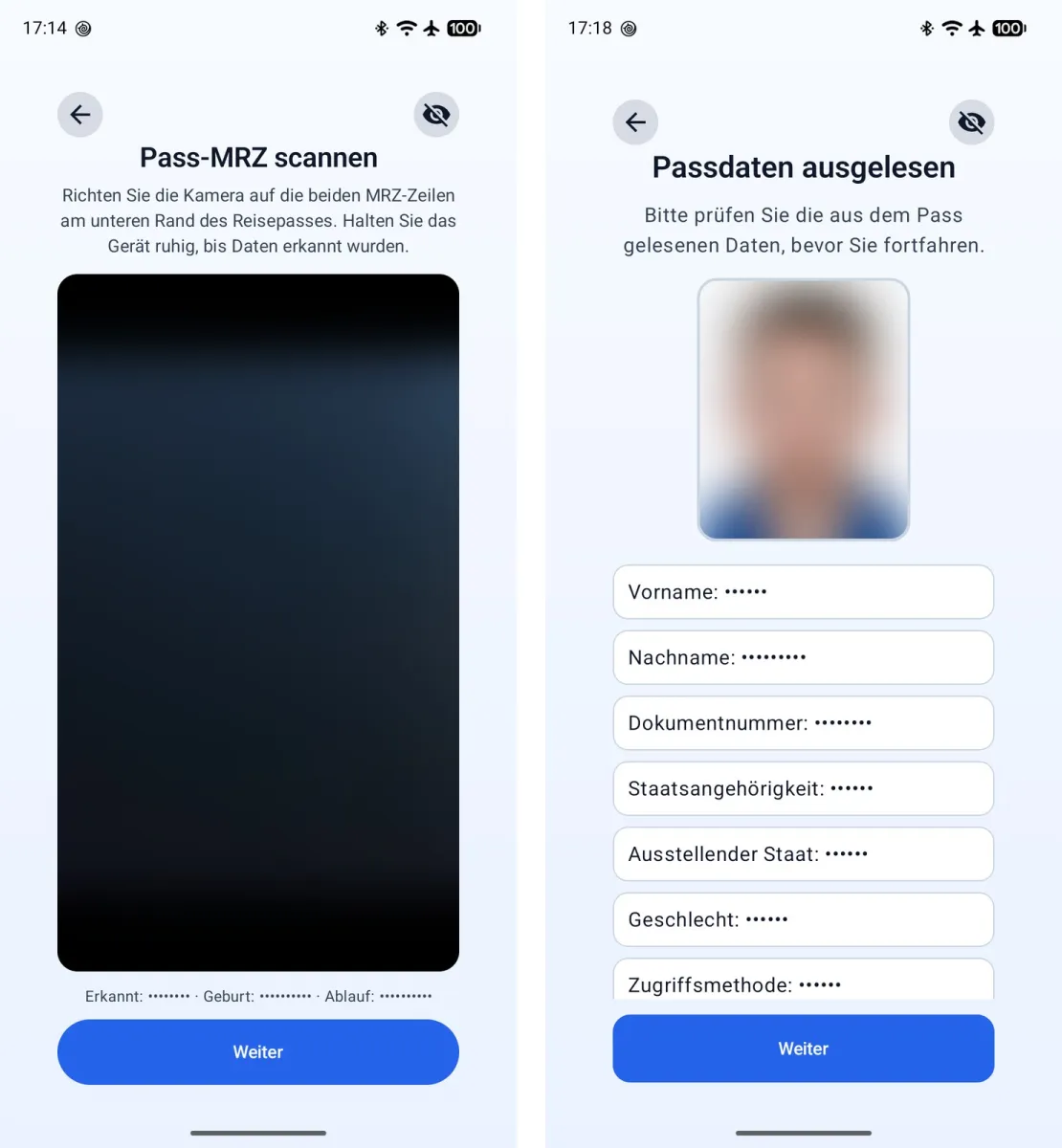
Taking over the reference portrait saves an additional image selection in the passport path. Since going back can discard data that has been read, the flow includes a warning for this. Without NFC hardware, the camera-based paths remain available.
Document photo: The camera captures a document image. A face crop is extracted from it as a reference and offered for confirmation or repetition in a separate review view. This path makes a depicted face usable for comparison. However, photographic capture confirms neither the authenticity nor the integrity of the underlying document.
e-card and local image: The e-card path checks the authenticity of the card. After Terminal Authentication with a terminal certificate stored in the app, the card proves its key via Chip Authentication. Its certificate chain is checked against a stored intermediate and root certificate. An encrypted channel (Secure Messaging) is then available. The prototype does not read personal data or a portrait in this process; after a successful check, the capture instructions follow directly. The option „Lokales Bild laden“ leads directly to capture without prior reference capture and mainly serves testing purposes. If no passport or document portrait is available in the later review, any image can be provided for the comparison via the image picker.
3.3. Guided portrait capture and quality check
After the capture instructions, the camera preview shows live hints. Settings control individual checks and optional visualisations. The application translates measurements into instructions: a head rotation angle outside the limit leads to the hint to look straight ahead. Low eye-openness values lead to the request to open the eyes. If there are several faces, the flow requests an unambiguous capture.
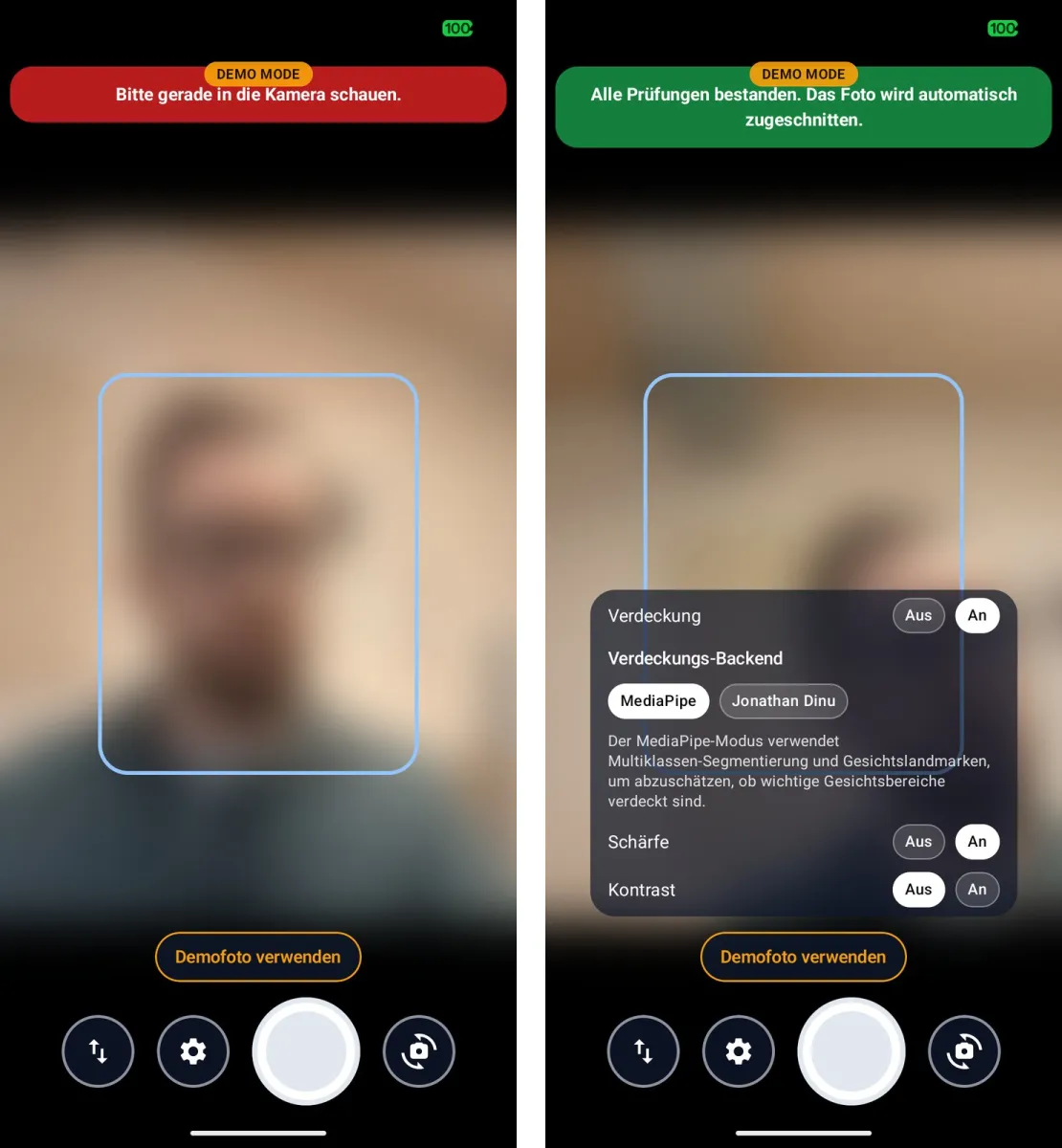
After the shutter is released, the captured image is analysed again. Reported problems are output as concrete rejection reasons. A head that is too small can be cropped automatically if there is sufficient resolution and no other problems exist. A successful check means that the activated rules did not produce any rejection reason based on the available measurements.
3.4. Review and face comparison
The review shows the accepted capture. If a reference portrait from a passport or document photo is available, the comparison function uses this image. Otherwise, it opens the image picker. Users can repeat or discard the capture. Warnings before certain backward navigation steps prevent captured images or document data from being discarded unnoticed.
The comparison settings make the PoC usable as an investigation tool. In addition to the model, the alignment can be selected. Background removal is optional. For brightness normalisation, „Off“, „Global“ and „CLAHE“ are available. CLAHE equalises local contrasts in limited image regions. These measures change the inputs of the comparison and can therefore influence the result.
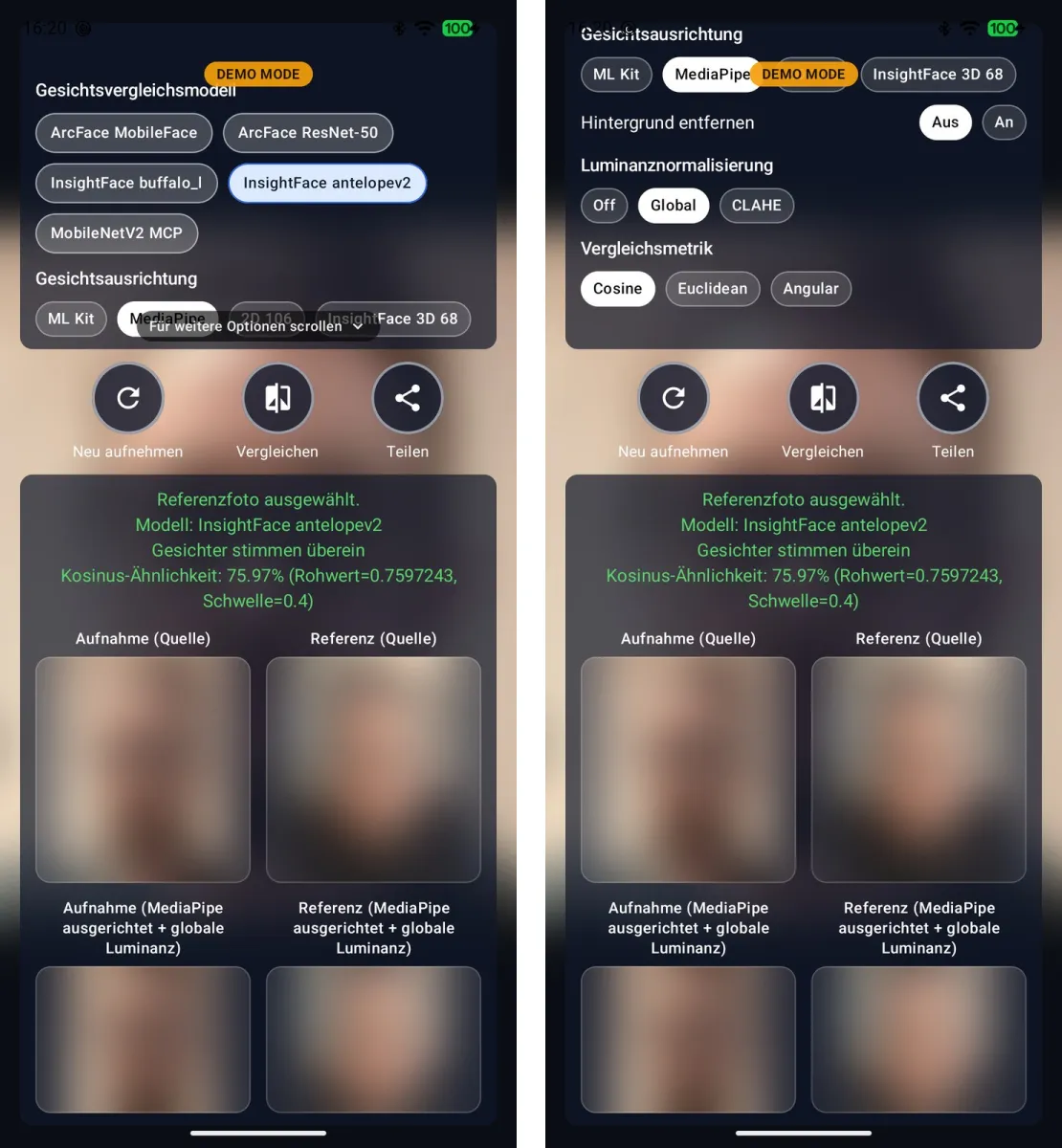
The display compares the source images or comparison previews with the preprocessed images. This makes visible which crop and which processing go into the comparison. With background removal activated, the source previews may already appear altered accordingly. The raw value, selected metric and threshold complement the image views.
3.5. Reading the results correctly
The interface uses three levels for all metrics. For cosine similarity, values from 0.6 count as „match“, from 0.4 to below 0.6 as „possible match“ and below that as „probably no match“. For Euclidean and angular distance, the same limits are converted into the corresponding distances; section 4.4 explains the conversion. The binary engine decision already uses 0.4 by default. The range between 0.4 and 0.6 thus marks results that the engine counts as a match but that lie close to the decision boundary and suggest a manual check. Both thresholds, 0.4 and 0.6, were set empirically and still need to be evaluated with a larger number of people of different ethnicities [19]. Percentage representations of a similarity value are not measured identity probabilities.
4. Technical implementation
4.1. Structure of the application
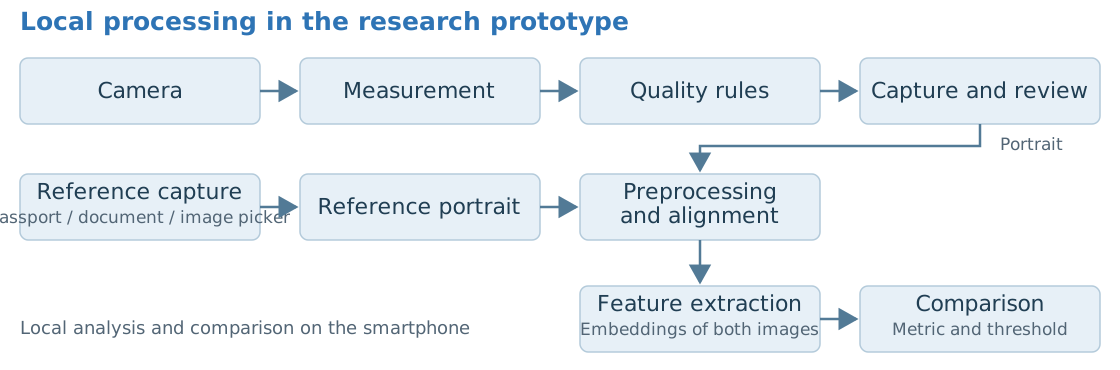
Kotlin Multiplatform bundles shared state, navigation and evaluation logic. Compose Multiplatform implements the shared user interface [11]. Platform-specific adapters integrate camera, image access, card communication and inference. The following figure shows the local Android processing of the implemented flow. Reference capture and portrait analysis are separate inputs. Reference and capture are only brought together in the comparison.
4.2. Technologies used
| Function | Technology in the project | Assignment |
|---|---|---|
| User interface / rules | Kotlin 2.3.20, Compose Multiplatform 1.10.3 | Shared flow, rules and state. |
| Camera | CameraX 1.5.3 [5] | Android preview, image analysis and capture. |
| Detection / OCR | ML Kit Face Detection 16.1.7, Text Recognition 16.0.1 [3, 4] | SDK findings, MRZ interpretation by a custom parser. |
| Facial landmarks / segmentation | MediaPipe Tasks Vision 0.10.32 [6] | Landmarker and segmentation models, custom gaze and occlusion derivation. |
| Model inference | ONNX Runtime Android 1.24.3 [7] | Execution of separately provided recognition, alignment and parsing models. |
| Quality metrics | Custom shared Kotlin image processing | Sharpness, RMS contrast, colour cast and reflection heuristics. |
| NFC / cryptography | JMRTD 0.8.5, Scuba 0.0.26, Bouncy Castle 1.83, cert-cvc 1.6.0 [10] | Passport communication, Passive and Active Authentication and building blocks of the prototypical card flows. |
Table 2: Technologies used and their assignment
Versions are taken from the project configuration. A framework provides the runtime and interfaces, while a model resource contains the trained weights. Only the custom evaluation maps model findings to the domain criteria. MediaPipe uses, among others, face_landmarker.task and selfie segmentation models. The ONNX models are separate resources [6, 7].
4.3. Implementation of the quality criteria
FaceMetrics collects findings from which evaluateFaceMetrics generates problem codes. CaptureValidation translates these codes into hints and checks the capture again. The following values are configurable PoC parameters from ThresholdConfig and not normative tolerances. The quality rules can be switched individually. The contrast rule is deactivated by default. Separately, occlusion analysis is initially set to „Off“ in the Android settings. The selectable methods are MediaPipe and JonathanDinu. The checks cover similar aspects as the quality components according to ISO/IEC 29794-5 but do not calculate standard-compliant quality values [14].
| Domain criterion | Measurement method | Implemented check | Technical limit |
|---|---|---|---|
| Single person | ML Kit face detection | Exactly one face, otherwise a separate error code. | Undetected faces are not taken into account. |
| Head size / crop | Face size relative to the image, crop calculation | 0.55–0.75; crop target 0.62. Minimum sides 600/800 px. | The face box is not a standard-compliant chin-to-crown measurement. |
| Eye position | Vertical position of the eyes | Eyes below or at the image centre are flagged. | No complete check of all format requirements. |
| Eyes open | ML Kit classification per eye | Openness value at least 0.60 each. | Model value. No flag if values are missing. |
| Neutral expression | Smile classification | Smile value at most 0.35. | Other forms of expression are not fully captured. |
| Mouth closed | Normalised lip distance | Mouth gap at most 0.018. | Facial landmarks and perspective influence the estimate. |
| Frontal pose / gaze | Euler angles, derivation from facial landmarks and iris | Angle magnitude at most 12°. Gaze centred, eyes visible. | Gaze method selectable, no direct gaze sensor. |
| Face visible | Facial landmarks / segmentation, optional ONNX face parsing [9] | Default: Off, selectable MediaPipe / JonathanDinu. Regional and global limits per method. | Heuristic. Result depends on method and visible regions. |
| Sharpness | Laplacian variance in the scaled face crop | At least 0.0012. | Image scaling and structure influence the value. |
| Contrast | RMS of the normalised face luminance | At least 0.09 (deactivated by default). | No complete proof of even illumination. |
| Colour neutrality | Colour analysis / chroma and channel spread | Limits 10 and 14 respectively. | Scene colours can influence the finding. |
| No glasses reflections | Bright pixel regions in the eye area | Area share 0.035; contiguous region 0.015. | No reliable semantic detection of reflections or glasses. |
Table 3: Implementation of the quality criteria
4.4. Model-based face comparison
Alignment geometrically aligns facial landmarks to a common target crop. The options are ML Kit, MediaPipe, InsightFace 106, InsightFace 3D 68 and detector variants for buffalo_l and antelopev2. Background removal and global or local brightness normalisation are additional preprocessing steps. ONNX Runtime then calculates the embeddings [7, 8].
| Regular model option | Weight file / classification |
|---|---|
| ArcFace MobileFace | w600k_mbf.onnx |
| ArcFace ResNet-50 | w600k_r50.onnx |
| InsightFace buffalo_l | w600k_r50.onnx, the same weights as ArcFace ResNet-50. However, 2D and 3D alignment use the separate face detector det_10g.onnx. |
| InsightFace antelopev2 | antelopev2_recognition.onnx (default selection). |
| MobileNetV2 MCP | mobilenetv2_mcp.onnx, separate model [12]. |
Table 4: Regular model options and weight files
Cosine similarity c evaluates the direction of the feature vectors. Higher values indicate greater similarity. For normalised embeddings, it corresponds to the Euclidean distance √(2 − 2c) and the angular distance arccos(c). For these distances, smaller values count as more similar. The engine converts the configured cosine threshold 0.4 to approximately 1.095 (Euclidean) or 1.159 rad (angular). For all metrics, the display additionally uses the limit 0.6, corresponding to approximately 0.894 (Euclidean) or 0.927 rad (angular), and labels values between the two limits as a possible match.
4.5. Technical prerequisites and prepared iOS integration
In the project, Android is configured from API 24 (Android 7.0). Compile and target SDK are set to 36. A camera, camera permission and suitable model resources are required. NFC hardware and NFC permission are needed for the card paths. Models and the CSCA master list for Passive Authentication are stored in the Android assets. The master list must be updated regularly.
Code and model licences must be considered separately. InsightFace publishes code under MIT, whereas the trained models provided are generally intended for non-commercial research. For further use, the respective conditions must be clarified [8]. Other model packages and libraries also have their own licence terms.
The iOS integration is prepared with native bridges and parts of preview, capture and analysis. The project configuration requires iOS 18.2. Functions and integrations are not fully completed. The existing comparison extracts general Vision feature prints after face detection and cropping and does not replicate the Android ONNX pipeline and its model options equivalently. Full platform alignment is not part of the status achieved.
4.6. Open work
For the capture check, the main need is to add criteria that are so far only captured indirectly. In addition, a traceable handling of unavailable measurements is needed. For a robust evaluation, test material, capture conditions and domain reference judgements must be defined in advance. The test material must include people of different ethnicities, since model-based assessments such as eye openness or the smile value, as well as colour and contrast metrics, can turn out differently depending on eye shape and skin tone.
For the comparison, the focus is on further development and calibration of the pipeline. Models and preprocessing steps require traceable resource versions. The empirically set thresholds 0.4 and 0.6 must be evaluated with captures of a larger number of people of different ethnicities and independently assessed image material, considering wrong decisions in both directions. The error rates of face recognition methods can differ significantly between demographic groups [19]. In addition, engine and display limits currently apply equally to all model options, although cosine thresholds are model-dependent. They must be calibrated per model.
The security checks of the passport path are experimental and must be audited independently before productive use. Open points include in particular checking revocation lists, verifying the signature of the master list itself, evaluating the BSI deviation list and a binding handling of failed checks. Presentation attack detection is also not implemented. Its effectiveness would have to be evaluated according to ISO/IEC 30107-3 [15].
The prepared iOS integration must be completed and aligned with the methods that are actually usable. A later embedding into an overall process can include backend integration and attestation.
5. Conclusion
With the proof of concept, there is now a working smartphone application that combines reference capture, guided portrait capture, local quality checking and face comparison in a continuous flow. The passport photo read from a passport via NFC or a portrait extracted from a document photo serves as the reference. For the passport, the app additionally checks the authenticity of the data read via Passive Authentication and, if supported, via Active Authentication. In addition, a prototypical authenticity check of the e-card and a test path with a locally selected image are implemented.
The guided capture translates measurements from ML Kit, MediaPipe and custom image analysis into concrete hints. Individually switchable quality rules check the live preview and the captured image; a head that is too small is cropped automatically if the resolution is sufficient. The face comparison runs entirely on the device. Five model options with four different weight files, several alignment methods, optional background removal, brightness normalisation and three metrics can be combined, while raw values and preprocessed images remain visible.
For demonstrations, the private mode hides personal content on the screen, and the demo mode makes all views reachable even without a document. Separating measurement, rule evaluation and hints creates an extensible basis; Kotlin Multiplatform bundles flow and rules across platforms. The origin of the reference is consistently considered separately from the similarity decision. The status achieved is a research prototype. It is to be classified neither as a finished passport photo app nor as a complete identity verification.
References
[1] ICAO: Doc 9303 – Machine Readable Travel Documents, Part 3: Specifications Common to all MRTDs, Eighth Edition, 2021. https://www.icao.int/sites/default/files/publications/DocSeries/9303_p3_cons_en.pdf. Accessed: 08.05.2026.
[2] Bundesministerium für Inneres: Passbild-Kriterien. https://www.bmi.gv.at/607/passbild_kriterien.html. Accessed: 08.05.2026.
[3] Google: ML Kit: Face detection concepts. https://developers.google.com/ml-kit/vision/face-detection/face-detection-concepts. Accessed: 08.05.2026.
[4] Google: ML Kit: Text recognition v2. https://developers.google.com/ml-kit/vision/text-recognition/v2. Accessed: 08.05.2026.
[5] Google: CameraX overview. https://developer.android.com/media/camera/camerax. Accessed: 08.05.2026.
[6] Google AI Edge: MediaPipe Face Landmarker und Image Segmenter. https://developers.google.com/edge/mediapipe/solutions/vision/face_landmarker, https://developers.google.com/edge/mediapipe/solutions/vision/image_segmenter. Accessed: 08.05.2026.
[7] Microsoft: ONNX Runtime: Mobile. https://onnxruntime.ai/docs/get-started/with-mobile.html. Accessed: 08.05.2026.
[8] InsightFace: InsightFace: 2D and 3D Face Analysis Project. https://github.com/deepinsight/insightface. Accessed: 08.05.2026.
[9] Jonathan Dinu: face-parsing. https://huggingface.co/jonathandinu/face-parsing, https://huggingface.co/Xenova/face-parsing/blob/main/onnx/model_quantized.onnx. Accessed: 08.05.2026.
[10] JMRTD: JMRTD: An Open Source Java Implementation of Machine Readable Travel Documents. https://jmrtd.org/. Accessed: 08.05.2026.
[11] JetBrains: Relationship between Compose Multiplatform and Jetpack Compose. https://kotlinlang.org/docs/multiplatform/compose-multiplatform-and-jetpack-compose.html. Accessed: 08.05.2026.
[12] Yakhyo: face-recognition. https://github.com/yakhyo/face-recognition, https://github.com/yakhyo/face-recognition/releases. Accessed: 08.05.2026.
[13] ISO/IEC: ISO/IEC 39794-5:2019 – Information technology – Extensible biometric data interchange formats – Part 5: Face image data. https://www.iso.org/standard/72156.html. Accessed: 08.05.2026.
[14] ISO/IEC: ISO/IEC 29794-5:2025 – Information technology – Biometric sample quality – Part 5: Face image data. https://www.iso.org/standard/81005.html. Accessed: 08.05.2026.
[15] ISO/IEC: ISO/IEC 30107-3:2023 – Information technology – Biometric presentation attack detection – Part 3: Testing and reporting. https://www.iso.org/standard/79520.html. Accessed: 08.05.2026.
[16] Bundesministerium für Inneres: Fotomuster für Ausweisdokumente. https://www.bmi.gv.at/607/files/passbild_kriterien_2022.pdf. Accessed: 08.05.2026.
[17] ICAO: Doc 9303 – Machine Readable Travel Documents, Part 11: Security Mechanisms for MRTDs, Eighth Edition, 2021. https://www.icao.int/sites/default/files/publications/DocSeries/9303_p11_cons_en.pdf. Accessed: 08.05.2026.
[18] Bundesamt für Sicherheit in der Informationstechnik: CSCA Masterliste (German Master List). https://www.bsi.bund.de/SharedDocs/Downloads/DE/BSI/ElekAusweise/CSCA/GermanMasterList.html. Accessed: 08.05.2026.
[19] P. Grother, M. Ngan, K. Hanaoka (NIST): Face Recognition Vendor Test (FRVT) Part 3: Demographic Effects, NISTIR 8280. https://doi.org/10.6028/NIST.IR.8280. Accessed: 08.05.2026.