Content providers are used on Android to expose data to other components and applications in a defined way. They act as a layer between the underlying data store and the application components that need access to the data. However, in newer versions of Android, in addition to this, this system is taking an increasingly important place in the security architecture of the system. In this report, we will look at how the content provider system works and how it is technically implemented. Furthermore, it will be discussed which security-relevant vulnerabilities have been found in relation to content providers.
1. Introduction
On the Android platform, the provision and sharing of data play a crucial role. A content provider is a central component of the Android framework that enables access to structured data for different applications. A content provider is an interface that enables access to databases, files or other persistent data stores in Android. Content providers are part of the inter-component communication (ICC) provided by Android. The content provider interface enables read and write access to data. In particular, content providers also enable shared access to data between different applications. This allows applications to access the same data in a uniform and coordinated way, and it abstracts the complexity of the underlying storage concept. Content providers make it possible to define permissions in order to restrict access to sensitive data and to prevent unauthorised access. They provide data through a uniform interface based on a content URI (Uniform Resource Identifier). Applications can use this URI to access the data provided by the content provider via the programming interface. In newer Android versions, however, content providers also take an increasingly important place in the security architecture of the system. For example, access to the file system is abstracted via the so-called Storage Access Framework, which in turn is based on content providers. The aim is to prevent every application that needs access to individual files from directly being granted the permission to access all files stored on the device. However, this transfers the responsibility for rights management entirely to the respective content provider. This report discusses how content providers are used by the Android system, how they can be provided by third-party applications, and which vulnerabilities related to content providers have been found in the literature.
2. Background
Content providers can be provided by any application in order to share data with other applications. However, there are also content providers that are provided by the system itself [1]. These content providers are therefore present on every Android device. Many of these content providers offer access to sensitive information, such as contacts, calendar entries, messages and other personal information. They are therefore secured by a clearly identifiable permission [2].
In older Android versions, applications could share files via the shared internal storage. To do so, the application had to request the permission READ_EXTERNAL_STORAGE to read files or the permission WRITE_EXTERNAL_STORAGE to write files in this storage area. With Android 6 [3], this permission now had to be granted by the user, but such one-time consent allowed permanent access to all data stored in the shared internal storage area. In addition to the data stored by other applications, this includes, for example, photos, videos, voice recordings, downloads and other media files. As has been shown over time, applications also exploited this comprehensive permission.
For example, the shared storage was exploited to circumvent Android’s permission model through collusion between two or more conspiring applications [4]. Each application taken on its own should appear harmless, but when they act together, they can pose a threat. The applications involved can coordinate their activities so that they are less conspicuous and do not immediately arouse suspicion. Splitting the behaviour across several applications therefore makes it harder to detect. One of the applications involved can, for example, use a permission it has received to read sensitive data and store it in the internal storage. The second application then forwards the collected data. The internal storage serves as a means of communication here [5].
Likewise, access to photos could be abused to find out the user’s location. This is because many camera applications write the location of the shot into the metadata of the image file. By reading this metadata, applications with storage access could thus determine where the user was at the time of the shot. This effectively circumvented the separate permission that is required for access to the location. To solve these problems, work was done on a new access system, Scoped Storage, which is based on content providers. With Android 10, Scoped Storage was introduced as a preview that was not yet mandatory, to give application developers time to adapt. With Android 11, Scoped Storage was improved and has been mandatory since then. For access to media files such as photos or videos, there is the MediaStore programming interface. This allows access to media files that were created by the application. If the application additionally wants to access media files that were created by other applications in the shared internal storage, the application must request the permission READ_EXTERNAL_STORAGE. For access to all other data, such as documents or downloads, the Storage Access Framework must be used. If an application wants access to files or directories that were created by other applications, the user must consent to this specific access. Access to the application-specific folders under Android/data/ is no longer possible. This makes it more difficult for applications to cooperate undetected via the internal storage.
3. Content providers
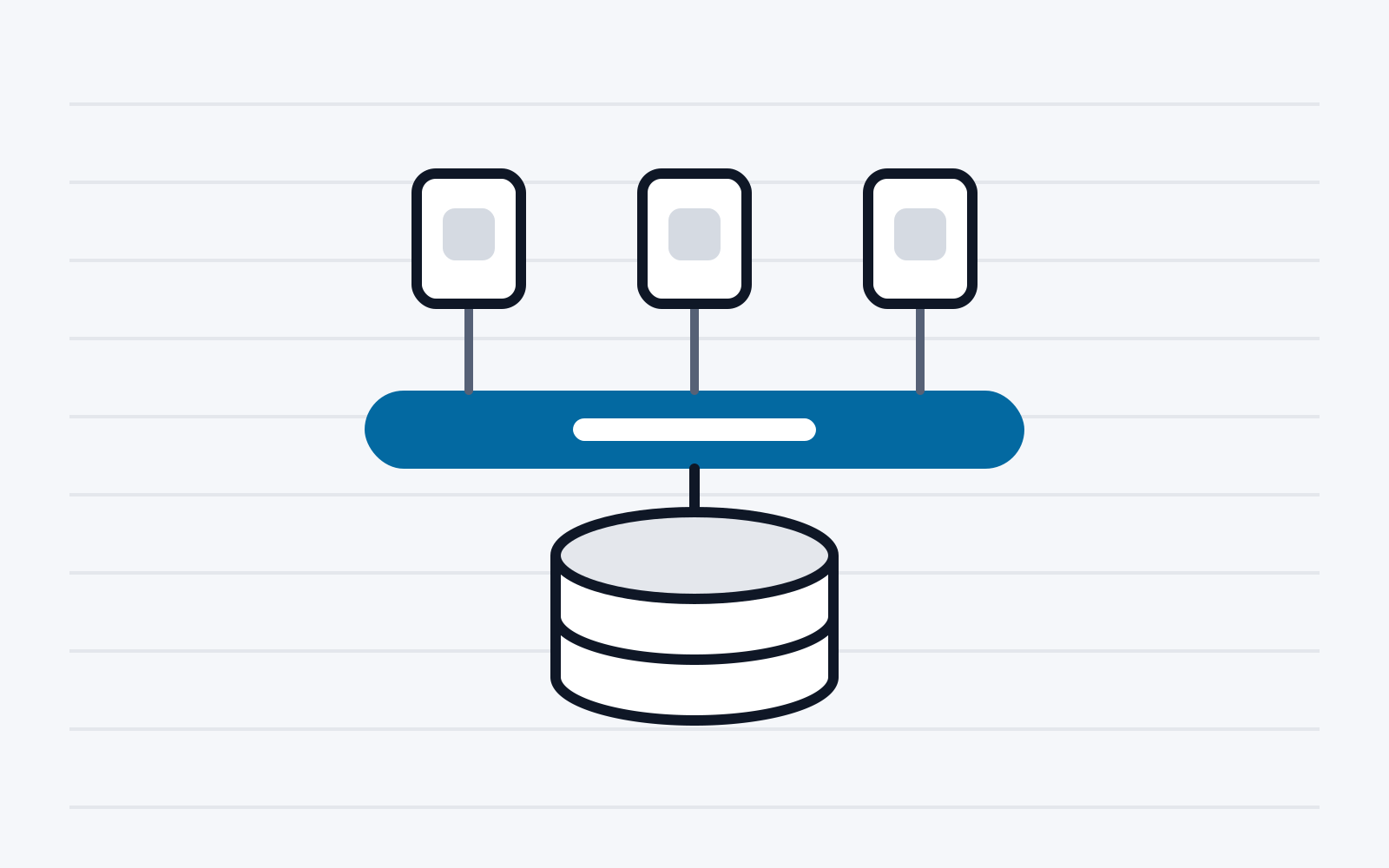
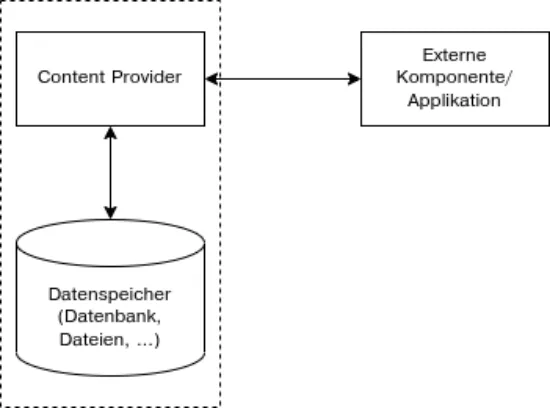
Content providers enable uniform access to the data of an application. Content providers enable both read and write access to the data. They are ideally suited to making data available to other applications, as they abstract the implementation details of the underlying storage layer, as shown in Figure 1. However, content providers can also be called by other components of the same application. This allows access to data to be abstracted within an application as well, which simplifies replacing or changing the underlying data store. If a content provider is used only by components of the same application, it should also be made available only to the application itself. When defining the content provider, this can be achieved by setting the android:exported flag in the application’s manifest to false. In newer Android versions, this is also the default value for security reasons if the flag is not explicitly set by the developer. The aim is to prevent data from being inadvertently made available to other, possibly untrusted applications on the device.
If sharing the data with other applications is desired, the android:exported flag in the application’s manifest must be set to true. This allows the content provider to be called by other applications. To protect data from access by unauthorised applications, however, the content provider should be protected by a permission. Here it is possible to create separate permissions for read or write access, or a permission that allows both. If the content provider is used only to share data with applications from the same developer, the android:protectionLevel can be set to signature. As a result, only applications that were signed with the same key when they were built have access.
Temporary or partial access
In addition, the content provider can grant even finer-grained permissions. In particular, it is possible for the provider to grant read or write access to individual elements [6]. To do so, the developer of the content provider specifies the element grant-uri-permission in the application’s manifest. This can be set to true to enable temporary access to all elements of the content provider, or it can contain individual paths for which temporary access can be enabled. This is also supported by many of the system’s content providers. This makes it possible to access a single element of a content provider, such as a contact or a file. The user selects the respective element that is to be shared with the calling application. As a result, an application that needs access only to individual contacts, for example, does not have to request the comprehensive READ_CONTACTS permission, which has to be granted by the user.
To gain access to individual elements of a content provider, an application must proceed as follows:
-
The application creates an intent and starts it. An intent is generally a call to another application or component. This intent contains either a specific content URI or, if this is not known to the application, a content type with the action to start a selection dialogue.
-
The content provider receives the intent and, where applicable, starts a selection dialogue or asks the user whether the requested content should be shared.
-
The user selects an element in the selection dialogue or confirms the request.
-
The content provider in turn creates an intent with the URI of the selected element and adds FLAG_GRANT_READ_URI_PERMISSION for read access and FLAG_GRANT_WRITE_URI_PERMISSION for write access. This intent is returned to the calling application.
-
Using the content URI received, the calling application can now read and/or write the element.
4. Literature
This chapter discusses which vulnerabilities related to content providers have been identified and how they were fixed, or how they can be found in applications. For example, [7] examined two different types of vulnerabilities that can occur when content providers are used. First, it was examined whether sensitive data is erroneously made available to other applications. Second, it was examined whether write access to content providers could be used to modify applications’ data in an abusive way. In the analysis carried out as part of that work, more than 62,000 applications were analysed. It was found that 2% of these applications potentially share sensitive data with other applications. This vulnerability was defined as a passive data leak. Furthermore, it was shown that 1.4% of the examined applications allow not only read but also write access to at least one of the content providers defined by the application. This even made it possible for the authors in some cases to influence the behaviour of the applications. If these applications have elevated permissions, it was sometimes even possible to influence system functions. For example, changing the data of an application’s content provider made it possible to block telephone calls or SMS messages from certain telephone numbers chosen by attackers. To reduce the prevalence of this vulnerability, content providers are no longer exported by default in newer Android versions. This means that content providers defined by the developer are no longer accessible to other third-party applications. A developer must now actively decide to share the contents of a content provider or to allow the contents of a content provider to be modified. This measure is intended to help against passive data leaks. However, [8] showed that some applications or libraries deliberately share sensitive data with other applications. In contrast to the previous work, active data leaks were thus found here. The focus was particularly on advertising libraries, which retrieve information from the system and then forward it. The retrieved data also came from content providers that were provided by the Android system.
To detect the potentially unjustified retrieval of data from content providers, the respective applications and their libraries must be examined. This usually relies on a static analysis of the application. This involves examining the source code, resources and other artefacts of an Android application without actually executing the application. To discover problems with content providers using static analysis, content providers must be supported as a source or sink. The IC3 framework [9] set itself this goal, in addition to supporting other ICC paradigms (inter-component communication). It supports the Uniform Resource Identifiers (URIs) that are common for content providers. Intents, which are used for other ICC paradigms, are supported as well. Both the content provider calls and the intents are defined as a COAL specification. COAL is a declarative language defined by the authors that makes it possible to declare ICC calls. In that work, all ICC messages possible under Android were defined in 750 lines of COAL code. This makes it possible to create an interprocedural control flow graph, which is needed for static analysis. Based on the control flow graph, a string parser was also developed, which makes it possible to extract the values of ICC calls from applications. This made it possible to extract about 85% of the ICC calls from the 460 applications examined. With regard to URIs used for content providers, 374 of the 511 URIs found (72%) could be resolved to a concrete value. A large proportion of the unresolved URIs originate from callbacks or from calls from other applications, some of which can only be detected during execution. A smaller number of URIs could not be resolved because they originated from more complex data types such as lists or sets, which were not supported by IC3.
Another static analysis framework that supports content providers is DroidRista [10]. It is based on a modified version of IC3 and improves it with regard to the evaluation and extraction of ICC links. In addition, a so-called instrumentor was developed, which improves the connection of the control flow graph across ICC methods. This allows applications that use cross-process means of communication such as content providers to be analysed even better. In particular, support for callbacks was improved. Static analysis is used to create the control flow graph, and the callbacks found are then analysed step by step. In the course of this process, the control flow graph is extended with the callbacks found in each pass. This results in better detection of ICC calls. The analysis of the APK was also improved. As a result, in the evaluation DroidRista finds more ICC calls and needs less time than IC3. When analysing applications from the Play Store, several potential data leaks were found.
APPLADroid [11] examines data flows across multiple applications. For example, an application that has access to a content provider that stores private data such as emails or contacts can pass this data on to other applications via its own content provider. The original content provider cannot detect that the data may be passed on to unauthorised applications. To find such data flows, APPLADroid performs a cross-application static analysis. It is based on SniffDroid [12] and extends it, among other things, by supporting content providers. Similarly to APPLADroid, COVERT [13] also tries to find applications that cooperate with other applications in order to circumvent permissions. For this purpose, a model of the examined applications is created using static analysis. The model created depicts the interactions between the applications. On the basis of this model, it is then examined whether there are potential vulnerabilities resulting from the interaction of the applications. In the evaluation, more than 500 applications were examined for vulnerabilities. It was found that many of the applications offer access to information and functions protected by permissions and are therefore potentially vulnerable to attacks by other applications.
In [14], the Android programming interface was examined for fingerprintable information sources. In addition to the methods and fields of the programming interface, the content providers provided by the system were also examined. A URI is required to call content providers. To obtain these, the return values of the methods and the contents of the fields were examined for content URIs. All values beginning with content:// were extracted. An attempt was then made to access these content providers. All providers that required no permission and could be called were then analysed. For this purpose, the contents of these content providers were extracted, that is, all rows and columns of the content providers were read. This process was repeated on different devices. The values obtained were then compared across the devices. If the values differed on the examined devices, they were analysed more closely. It turned out that, above all because of manufacturer customisations, potentially secret data was available to all applications. This included, for example, unique identifiers, email addresses and cryptographic keys.
In [15], preinstalled applications on Android smartphones are checked for potential vulnerabilities. These can be particularly interesting for attackers, as they may have access to content providers and permissions that are protected by system permissions. For this purpose, the preinstalled applications were extracted from several Android smartphones. A static analysis was then run on them. This involved searching for a control flow graph of possible external calls to the application in order to use the permission. The data flow was then analysed to detect whether the use can also be triggered by a third-party application. It was found that many of the preinstalled applications make it possible to use a permission. Similarly, [16] analysed the preinstalled applications of custom ROMs. Here too, it was found that many of the preinstalled applications can potentially share confidential data.
The switch to the Storage Access Framework, which is based on content providers, also led to unintended security vulnerabilities. For example, the built-in screenshot tool of Google Pixel devices offers the function of cropping screenshots directly after they are taken, in order to remove private information from the screenshots, for example. To do this, the screenshot tool opens the captured file and overwrites the existing capture with the edited one. When overwriting the file, the screenshot tool uses the “write” mode of the programming interface. In Android 9, that is, before the introduction of the Storage Access Framework, using this mode emptied the existing file before the changed content was written. As a result, the screen capture was cropped correctly. With the introduction of the Storage Access Framework, however, the behaviour of the “write” mode changed. The existing file is no longer emptied by the system before writing (the “write-truncate” mode must now be chosen for this). Because the edited version of the screen capture is smaller than the original, part of the original capture unintentionally remains in the resulting file [17]. If this file is shared, the remaining part of the original capture can be reconstructed, which means that information believed to be secret can potentially be recovered.
5. Conclusion
This report showed what the content provider interface on Android is used for. It looked in more detail at how the data stored in it can be secured by means of permissions. It also showed how temporary permissions can restrict access by external applications to part of the stored data. Furthermore, it discussed how content providers are used by the system itself and how this has changed in newer Android versions. Finally, it showed which vulnerabilities there have been in relation to content providers and how they can be found.
References
[1] Android Developers, „android.provider,“ Google Inc., [Online]. Available: https://developer.android.com/reference/android/provider/package-summary. [Zugriff am 26 06 2023].
[2] Android Developers, „Personal Information - Application Security,“ Google Inc., [Online]. Available: https://source.android.com/docs/security/overview/app-security#personalinformation. [Zugriff am 13 06 2023].
[3] Android Developers, „Android 6.0 Changes,“ Google Inc., [Online]. Available: https://developer.android.com/about/versions/marshmallow/android-6.0-changes#behaviorruntime-permissions. [Zugriff am 15 06 2023].
[4] I. Khokhlov und L. Reznik, „Colluded Applications Vulnerabilities in Android Devices,“ IEEE International Symposium on Dependable, Autonomic and Secure Computing (DASC), 2017.
[5] S. Bhandari, W. B. Jaballah, V. Jain, V. Laxmi, A. Zemmari, M. S. Gaur, M. Mosbah und M. Conti, „Android inter-app communication threats and detection techniques,“ Computers & Security, Nr. 70, pp. 392-421, 2017.
[6] A. Developers, „Get access with temporary permissions,“ Google Inc, [Online]. Available: https://developer.android.com/guide/topics/providers/content-provider-basics#get-accesswith-temporary-permissions. [Zugriff am 15 06 2023].
[7] Y. Zhou und X. Jiang, „Detecting Passive Content Leaks and Pollution in Android Applications,“ 20th Annual Network & Distributed System Security Symposium, 2013.
[8] M. Grace, W. Zhou, X. Jiang und A.-R. Sadeghi, „Unsafe Exposure Analysis of Mobile In-App Advertisements,“ ACM Conference on Security and Privacy in Wireless and Mobile Networks, pp. 101-112, 2012.
[9] D. Octeau, D. Luchaup, M. Dering, S. Jha und P. McDaniel, „Composite Constant Propagation: Application to Android Inter-Component Communication Analysis,“ IEEE/ACM International Conference on Software Engineering, pp. 77-88, 2015.
[10] A. Alzaidi, S. Alshehri und S. M. Buhari, „DroidRista: a highly precise static data flow analysis framework for android applications,“ International Journal of Information Security, p. 523–536, 2019.
[11] V. Jain, V. Laxmi, M. S. Gaur und M. Mosbah, „APPLADroid: Automaton Based Inter-app Privacy Leak Analysis for Android,“ International Conference on Security & Privacy, p. 219–233, 2019.
[12] V. Jain, S. Bhandari, V. Laxmi, M. S. Gaur und M. Mosbah, „SniffDroid: Detection of Inter-App Privacy Leaks in Android,“ IEEE International Conference on Trust, Security and Privacy in Computing and Communications (TrustCom), 2017.
[13] H. Bagheri, A. Sadeghi, J. Garcia und S. Malek, „COVERT: Compositional Analysis of Android Inter-App Permission Leakage,“ IEEE Transactions on Software Engineering, Bd. 41, Nr. 1, pp. 866-886, 2015.
[14] G. Palfinger und B. Prünster, „AndroPRINT: Analysing the Fingerprintability of the Android API,“ Availability, Reliability and Security - ARES, pp. 94:1 - 94:10, 2020.
[15] M. C. Grace, Y. Zhou, Z. Wang und X. Jiang, „Systematic Detection of Capability Leaks in Stock Android Smartphones,“ Network and Distributed System Security Symposium, 2012.
[16] N. T. Cam, V.-H. Pham und T. A. Nguyen, „Sensitive Data Leakage Detection in Pre-Installed Applications of Custom Android Firmware,“ IEEE International Conference on Mobile Data Management, pp. 340-343, 2017.
[17] D. Buchanan, „Exploiting aCropalypse: Recovering Truncated PNGs,“ 18 03 2023. [Online]. Available: https://www.da.vidbuchanan.co.uk/blog/exploiting-acropalypse.html. [Zugriff am 16 06 2023].
[18] K. Kollnig, A. Shuba, R. Binns, M. V. Kleek und N. Shadbolt, „Are iPhones Really Better for Privacy? A Comparative Study of iOS and Android Apps,“ Proc. Priv. Enhancing Technol., pp. 6–24, 2022.
[19] I. Shklovski, S. D. Mainwaring, H. H. Skúladóttir und H. Borgthorsson, „Leakiness and creepiness in app space: perceptions of privacy and mobile app use,“ Conference on Human Factors in Computing Systems, pp. 2347-2356, 2014.
[20] C. F. Torres und H. Jonker, „Investigating Fingerprinters and Fingerprinting-Alike Behaviour of Android Applications,“ European Symposium on Research in Computer Security - ESORICS, pp. 60-80, 2018.
[21] K. Yang, J. Zhuge, Y. Wang, L. Zhou und H. Duan, „IntentFuzzer: detecting capability leaks of android applications,“ ASIA CCS ‘14: Proceedings of the 9th ACM symposium on Information, computer and communications security, p. 531–536, 2014.
[22] M. Grace, Y. Zhou, Z. Wang und X. Jiang, „Systematic Detection of Capability Leaks in Stock Android Smartphones,“ 19th Annual Network & Distributed System Security Symposium, 2012.
[23] N. T. Cam, V.-H. Pham und T. A. Nguyen, „Sensitive Data Leakage Detection in Pre-Installed Applications of Custom Android Firmware,“ 18th IEEE International Conference on Mobile Data Management (MDM), 2017.