In order to recognise a user across different applications, a fingerprint of the used device can be created. Specialised software libraries are often used for this purpose, which collect data accessible to an application from various sources of information. The collected information is then combined to calculate a fingerprint. This can be calculated locally on the device or by transmitting the collected data to a backend. The project analyses which information fingerprinting libraries on Android use to create a fingerprint. For this purpose, it is analysed which methods are called and which information sources are retrieved. In addition, it is analysed how the libraries use the data to calculate the fingerprint. Finally, the project seeks to prevent the creation of a fingerprint by making changes to the programming interface of Android.
1. Introduction
In today’s digital world, protecting the privacy of users of mobile applications is of crucial importance. Mobile devices, especially smartphones, have become a central target for data collectors and advertising networks because of their constant connectivity, the availability of sensitive data and their diverse interaction options. One technique that is becoming increasingly important in this context is fingerprinting. Fingerprinting makes it possible to uniquely identify a device, and thereby the user, by collecting specific information and characteristics, without having to use unique identifiers. This poses a challenge for data protection, as fingerprinting is harder to detect and prevent. The aim of this report is to analyse various fingerprinting libraries used in Android applications and to examine how they work. In addition, it is intended to show which countermeasures exist to prevent or minimise fingerprinting on Android devices.
2. Background
The fingerprinting of smartphones, as carried out by applications, is a technique in which specific information about a device is collected in order to identify it uniquely. This is usually done without directly querying or using unique identifiers such as the IMEI number or the MAC address, especially since these can no longer be retrieved by third-party programs on newer Android versions. Instead, applications or libraries specialised for this purpose use a large number of data points that together produce a unique fingerprint of the device. [1] showed that it is possible to create a fingerprint on Android from information that applications can retrieve. [2] examined the fingerprinting activities of various Android applications. It found that advertising and specialised tracking libraries embedded in the applications retrieve a large amount of information that can be used to create a fingerprint. [3] systematically examines which information sources are available on Android for creating a fingerprint. Subsequently, [4] presented AndroPROTECT. This is a framework that, based on the information sources identified in [3], automatically creates patches that reduce the fingerprintability of Android smartphones by changing the information that can be retrieved.
3. Analysis
This section takes a closer look at the two fingerprinting libraries TrustDevice Android [5] and FingerprintJS-Android [6]. For this purpose, the source code of the libraries was examined. The following describes which information is collected by the two libraries and how it is used to calculate a fingerprint.
3.1. Collection of the raw data for creating the fingerprint
An overview of all collected raw data can be found in Table 1. It shows that some of the information sources are retrieved by both libraries. In total, TrustDevice Android combines information from 45 sources, while FingerprintJS-Android retrieves data points from a total of 48 information sources. The information sources retrieved by both libraries include the fields in the android.os.Build class. These contain, among other things, information about the device model used, the device manufacturer and software versions. TrustDevice Android reads more fields of this class than Fingerprintjs-Android. This includes, for example, the product name or the build ID of the operating system, which are retrieved only by TrustDevice Android. In addition to the information in the Build class, both libraries read further hardware details. These include, for example, the size of the installed main memory and of the device storage, as well as the list of available device sensors. Besides the hardware and software details of the device used, both libraries collect information about settings made by the user. Information about the language set, the locale used, as well as the country and time zone is read. Both libraries also determine further settings, such as the use of developer mode, the activation status of various accessibility services, the input method used and network settings. Much of this information is retrieved from the Settings content providers [7], which provide access to a large number of settings. In addition, both libraries also try to retrieve the list of installed applications as well as system applications.
Some of the collected information is not retrieved directly via the programming interface but via the file system. In particular, the information about the installed processor, such as name, architecture and number of CPU cores, is read from the file /proc/cpuinfo.
The information about the battery, such as its capacity or health, is retrieved via a hidden programming interface. This refers to methods or classes of the programming interface that are not intended for use by third-party applications. However, they are not completely blocked for third-party applications and can be called via reflection, for example.
Further information sources are retrieved by only one of the two libraries. Compared to Fingerprintjs-Android, TrustDevice Android also collects the physical size of the screen, the screen resolution used and the screen brightness. The path of the file storage is also retrieved. In addition, TrustDevice Android retrieves information about battery level and battery temperature as well as the available main memory and internal storage. In comparison, Fingerprintjs-Android retrieves further hardware details, such as the list of installed cameras, the highest supported OpenGLES version and available input devices. The library also determines details about the available media codecs, security providers and the status of the fingerprint sensor. The library also retrieves further settings that can be influenced by the user, including the date and time format used, the font size, the use of autocomplete, and the file paths of the ringtone and the alarm tone.
In addition to the data collected for creating the fingerprint, the two libraries retrieve further identifying characteristics. FingerprintJS-Android collects the developer-specific ANDROID_ID, the APK-specific Media DRM identifier (also called Widevine ID) and the Google Services Framework identifier. TrustDevice Android likewise collects the ANDROID_ID, the Advertising Identifier and the Media DRM identifier as well as the Google Services Framework identifier. In addition, TrustDevice Android also collects the Google Advertising Identifier (which the user can deactivate) and the firmware-specific VBMeta digest [8].
In addition to the information mentioned above, TrustDevice Android collects information about the rooting status of the device. It retrieves whether the installed operating system is a debug build, whether root binaries were found, whether the rooting tool Magisk or the application patcher Xposed is installed, or whether hooks were detected. It also queries whether the device is an emulator or whether a VPN is used.
3.2. Creation of the fingerprint
TrustDevice Android prepares the collected data points as a JSON structure and sends it to a backend in order to calculate a fingerprint from it. It was therefore not possible to determine how the fingerprint is created from the collected raw data. Unlike TrustDevice Android, FingerprintJS Android creates the fingerprint directly on the device. For this purpose, the individual data points are concatenated into a string. This is then passed to a hash function, which creates a 128-bit fingerprint from it. The hash function MurmurHash3 [9] is used for this. It is a fast hash function developed for use in hash tables or Bloom filters. It should be noted that this hash is not suitable for cryptographic applications. The collected information about the ANDROID_ID, the Media DRM identifier and the Google Services Framework identifier is not included by FingerprintJS Android in the calculation of the fingerprint.
Table 1 Overview of the properties queried by the two fingerprinting libraries examined.
| Property | TrustDevice | Fingerprintjs-Android |
|---|---|---|
| Device model | ✓ | ✓ |
| Manufacturer | ✓ | ✓ |
| Android version | ✓ | ✓ |
| SDK version | ✓ | ✓ |
| Kernel version | ✓ | ✓ |
| Build fingerprint | ✓ | ✓ |
| Hardware name | ✓ | |
| Product name | ✓ | |
| Brand | ✓ | |
| Build ID (Build.DISPLAY) | ✓ | |
| Build host | ✓ | |
| Battery health | ✓ | ✓ |
| Battery status | ✓ | |
| Battery level | ✓ | |
| Battery temperature | ✓ | |
| Battery capacity | ✓ | ✓ |
| Processor type | ✓ | ✓ |
| Processor | ✓ | ✓ |
| Number of CPU cores | ✓ | ✓ |
| Processor architecture | ✓ | ✓ |
| Country | ✓ | ✓ |
| Language | ✓ | ✓ |
| Time zone | ✓ | ✓ |
| Total RAM | ✓ | ✓ |
| Available RAM | ✓ | |
| Total storage | ✓ | ✓ |
| Available storage | ✓ | |
| Installed apps | ✓ | ✓ |
| Installed system applications | ✓ | ✓ |
| Sensors | ✓ | ✓ |
| Android Debug Bridge enabled | ✓ | ✓ |
| Developer mode enabled | ✓ | ✓ |
| HTTP proxy set | ✓ | ✓ |
| Data roaming enabled | ✓ | ✓ |
| Mock location enabled | ✓ | |
| Accessibility services enabled | ✓ | ✓ |
| Default input method | ✓ | ✓ |
| Touch exploration enabled | ✓ | ✓ |
| Screen brightness | ✓ | |
| Screen timeout | ✓ | ✓ |
| Screen resolution | ✓ | |
| Screen size | ✓ | |
| File storage path | ✓ | |
| Application package name | ✓ | |
| Device uses Harmony OS | ✓ | |
| Input devices | ✓ | |
| List of camera lenses | ✓ | |
| Maximum supported OpenGL ES version | ✓ | |
| Storage encryption status | ✓ | |
| List of media codecs | ✓ | |
| Security providers | ✓ | |
| Transition animation scale (accessibility setting) | ✓ | |
| Window animation scale (accessibility setting) | ✓ | |
| Real-time text (RTT) status | ✓ | |
| File path of the alarm | ✓ | |
| Date format | ✓ | |
| Behaviour of the hang-up button | ✓ | |
| Font size | ✓ | |
| Text autocomplete | ✓ | |
| Automatic punctuation | ✓ | |
| Time format (12/24h) | ✓ | |
| Use of a device PIN | ✓ | |
| Fingerprint sensor status | ✓ | |
| Path of the ringtone set | ✓ | |
| Available locales | ✓ | |
| Total number of information sources used | 45 | 48 |
4. Prevention of fingerprint creation
This section tests whether the AndroPROTECT framework [4], a framework for reducing the fingerprintability of Android devices, can prevent the creation of a fingerprint. For this purpose, the patch package created by AndroPROTECT is applied to the demo applications of the two fingerprinting libraries examined. The patched applications were installed on a Google Pixel 7a (as test device) and on a Pixel 6 Pro (as reference device) running Android 14. Using the reference device, a patch package is first created with AndroPROTECT. To do so, AndroPROTECT scans the programming interface of the device and retrieves all information sources that can be accessed by a third-party application. For information sources that are potentially fingerprintable, patches are then created that standardise the retrievable information. These are combined into a patch package. This package can then be applied to Android application packages in order to reduce the retrievable fingerprintable information. In the course of this analysis, the patch package is applied to the demo applications of the fingerprinting libraries and the patched application is then installed on the test device. The results of the analysis are presented below.
The FingerprintJS Android demo application calculates a local device identifier based on the information collected on the device. In the demo application, various stability levels can be selected for the creation of the fingerprint. Depending on the stability level selected, the application chooses different information sources for calculating the fingerprint. On the test device, the patched demo application calculated the same fingerprint as on the reference device at all stability levels. This shows that AndroPROTECT can effectively prevent the creation of the fingerprint. All retrieved information sources that differed from device to device were patched by AndroPROTECT.
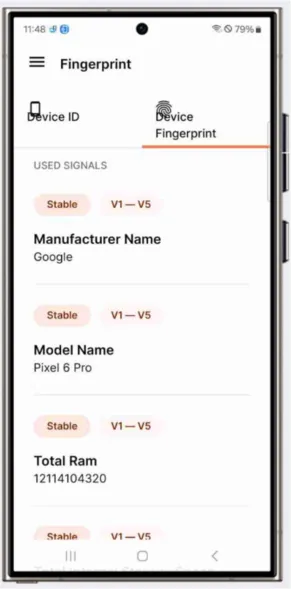
The TrustDevice demo application collects device information in a JSON structure, which can be transmitted to a backend for calculating the fingerprint. In the following, the JSON data of the test device is compared with that of the reference device. It was found that the collected data is identical on both devices examined and therefore cannot be used to create a distinguishable fingerprint. In addition to the data collected from the Android API, TrustDevice uses a native library to verify the root status of the device. Native binaries are currently not supported by AndroPROTECT. However, since our test devices were not rooted, the information returned by these checks did not differ between the devices. Moreover, hiding the root status was not a goal of AndroPROTECT, as other solutions exist, such as MagiskHide [10].
5. Conclusion
This report examined fingerprinting libraries for Android applications. Two libraries were selected for closer analysis. It was found that both libraries collect information from a similar number of sources in order to create a fingerprint of the device. There is a certain overlap in the information sources used, especially regarding basic information such as software and hardware details as well as certain settings that can be influenced by the user. While TrustDevice Android sends the collected data for creating the fingerprint to a backend, Fingerprintjs-Android calculates the fingerprint locally on the device by hashing the concatenated values. Finally, it was shown that patching the applications prevented the creation of a distinguishable fingerprint.
References
[1] W. Wu, J. Wu, Y. Wang, Z. Ling und M. Yang, „Efficient Fingerprinting-Based Android Device Identification With Zero-Permission Identifiers,“ IEEE Access, pp. 8073 - 8083, 2016.
[2] C. F. Torres und H. Jonker, „Investigating Fingerprinters and Fingerprinting-Alike Behaviour of Android Applications,“ 23rd European Symposium on Research in ComputerSecurity - ESORICS 2018, pp. 60 - 80, 2018.
[3] G. Palfinger und B. Prünster, „AndroPRINT: Analysing the Fingerprintability of the Android API,“ ARES 2020: The 15th International Conference on Availability, Reliability and Security, pp. 94:1 94:10, 2020.
[4] G. Palfinger, „AndroPROTECT: Hardening the Android API against Fingerprinting,“ NSS 2024: 18th International Conference on Network and System Security, 20 11 2024.
[5] TrustDecision, „GitHub - trustdecision/trustdevice-android: Leading open source version of android device fingerprint, accurate deviceID and risk identification,“ 2022. [Online]. Available: https://github.com/trustdecision/trustdevice-android. [Zugriff am 26 09 2024].
[6] „GitHub - fingerprintjs/fingerprintjs-android: Swiss army knife for identifying and fingerprinting Android devices,“ 2020-2023. [Online]. Available: https://github.com/fingerprintjs/fingerprintjsandroid. [Zugriff am 26 09 2024].
[7] Android Developers, „Settings,“ 2024. [Online]. Available: https://developer.android.com/reference/android/provider/Settings. [Zugriff am 26 09 2024].
[8] Google Inc, „The VBMeta Digest - Android Verified Boot 2.0,“ [Online]. Available: https://android.googlesource.com/platform/external/avb/+/master/README.md#the-vbmetadigest. [Zugriff am 26 09 2024].
[9] A. Appleby, „MurmurHash3 Quellcode - Github,“ 09 01 2016. [Online]. Available: https://github.com/aappleby/smhasher/blob/master/src/MurmurHash3.cpp. [Zugriff am 25 09 2024].
[10] J. Wu, „GitHub - topjohnwu/Magisk: The Magic Mask for Android,“ [Online]. Available: https://github.com/topjohnwu/Magisk. [Zugriff am 23 09 2024].
[11] Google Inc., „Android API reference | Android Developers,“ 02 03 2024. [Online]. Available: https://developer.android.com/reference. [Zugriff am 14 06 2024].
[12] Google Inc., „Content Providers | Android Developers,“ 23 01 2024. [Online]. Available: https://developer.android.com/guide/topics/providers/content-providers. [Zugriff am 14 06 2024].
[13] Google Inc., „SDK Runtime Overview - Process Isolation,“ 10 06 2024. [Online]. Available: https://developers.google.com/privacy-sandbox/relevance/sdk-runtime#process-isolation. [Zugriff am 12 06 2024].
[14] „Best practices for unique identifiers | Android Developers,“ 23 04 2024. [Online]. Available: https://developer.android.com/identity/user-data-ids. [Zugriff am 14 06 2024].