The Android permissions system is a key security feature that is used to control the access of applications to certain resources and functions of the device. Android offers a wide range of permissions that can be requested by applications, including access to the camera, location, contacts, storage and more. Users have control over these permissions and can decide whether or not to grant an application permission to access certain resources. The permission system has changed over the years to address new threats and meet the need for more privacy. The report shows how the permission system has changed over different Android versions and how the permission system is technically structured. It also explains available studies in the literature that evaluate the security aspects of the permission system.
1. Introduction
The Android permission system plays a central role in the security and privacy protection of users of mobile applications. Since the introduction of Android in 2008, the permission model has continuously evolved to meet growing demands for security and privacy. Early Android versions were based on a rigid permission model in which users had to grant all requested permissions in bulk when installing an application. As mobile applications became more complex and users became more security-conscious, this system came to be regarded as increasingly inadequate. Over the years, Google has gradually refined and improved permission management in Android to allow finer control by users. In particular, from Android 6.0 (Marshmallow) onwards, the permission system was fundamentally revised so that permissions can be granted depending on context.
This report analyses the development of the Android permission system from its beginnings to the current versions. It highlights the essential changes and innovations with regard to security mechanisms, usability and privacy. The aim is to convey a comprehensive understanding of the evolution of this central aspect of the Android ecosystem and to shed light on its effects.
2. Background
2.1. History of the permission system on Android
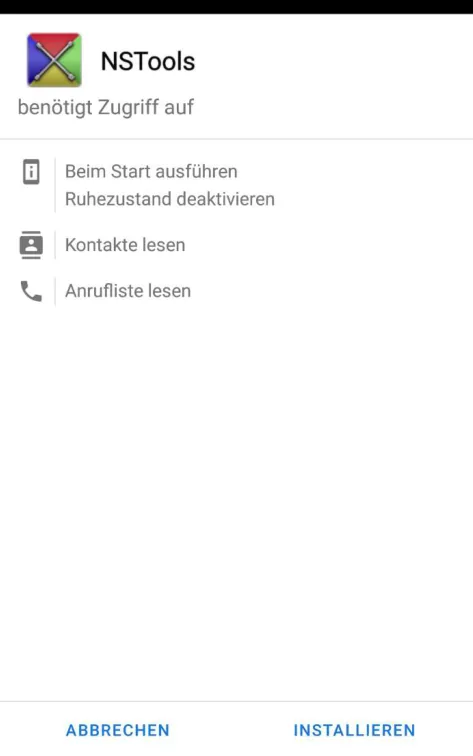
Since the first release of Android in 2008, numerous privacy measures have been introduced and improved across the various versions. One of the most important changes to the Android permission system was made in version 6.0. In earlier versions, permissions for applications had to be granted at installation time. This model lacked granularity [1] and did not allow users to restrict access to individual permissions. Users therefore had to either grant all permissions requested by an application or abort the installation, which meant they could not use the application. This problem was further exacerbated by applications requesting more permissions than necessary, which ultimately led to an excessive granting of permissions to applications [2]. Figure 1 shows an information screen that is displayed to the user when an application developed for an Android version before 6.0 is installed.
To solve this problem and give users more control, a runtime permission model was introduced with Android 6.0. The new permission model requires applications to request certain permissions, in particular those classified as dangerous, at runtime. There are two important permission types that can be requested by any third-party application. The so-called normal (or “audit-only”) permissions are still granted at installation time. According to the developer documentation, these pose “very little risk to the user’s privacy and the operation of other applications” [3]. In contrast, runtime permissions, or permissions classified as “dangerous”, allow access to potentially privacy-relevant information when they are granted. Newer versions of Android have refined this model. For example, version 10 introduced non-binary permissions, that is, permissions that allow more than just the two choices “Allow” or “Deny”. For instance, the permission to retrieve the device location can be granted to an application only while it is actively being used in the foreground by the user. Android 11 refined this system further. Temporary permissions were added, which are granted for a single use only. The corresponding user interface is shown in Figure 2. Android 11 also resets the granted permissions of unused applications. Furthermore, so-called special permissions were introduced, which have an even higher protection class than runtime permissions and can only be granted via the settings application. More on the different permission types can be found in Section 3.2.
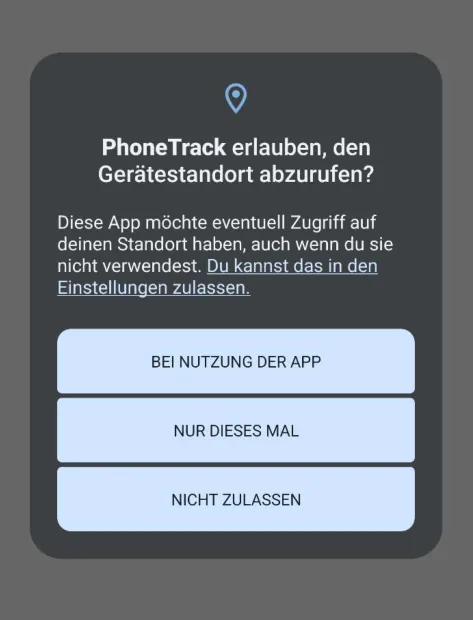
Permanent access to the device location in the background is specially protected and can therefore only be allowed in the settings application.
Access to identifiers has likewise been made harder or prevented across the versions. With Android 6.0, access to some of the unique device identifiers, such as the IMEI and the MAC addresses associated with Bluetooth and Wi-Fi hardware, was moved behind a dangerous permission. Applications targeting Android 6.0 or higher therefore needed the user’s consent to access them. With Android 8.0, the behaviour of the ANDROID_ID was changed [4]. In earlier versions, the ANDROID_ID was created when a user account was set up on a device. Applications could thus use it as a unique identifier to track a user across different applications from different developers. From Android 8.0, the ANDROID_ID was changed so that a separate ANDROID_ID is generated per signing key, which made it impossible to track users across applications from different developers. With Android 10 [5], additional restrictions for unique identifiers were introduced. In particular, access to the IMEI and other non-resettable device identifiers was moved to privileged permissions, such as the READ_PRIVILEGED_PHONE_STATE permission. These privileged permissions cannot be requested by third-party applications. Third-party applications targeting Android 10 or newer therefore have no access to these identifiers.
As an alternative to non-resettable device identifiers, Google introduced the Google Advertising Identifier. The Google Advertising Identifier is a unique advertising identifier that users can reset and delete and that belongs to the Google Play services [6]. In contrast to immutable device identifiers, it can be reset in the device settings. Users of a device can also specify in the settings that they do not want to be tracked with the Google Advertising Identifier. In earlier versions of Google Play services, this merely meant for an application that the advertising identifier should not be used. Since 2021, however, the Google Advertising Identifier can be disabled completely, with the result that applications querying the advertising identifier on a device where it has been disabled receive only a string of zeros. In addition, an application targeting Android 13 and higher must also request the permission com.google.android.gms.permission.AD_ID. However, as this is a normal permission, a user cannot deny access to this permission on a per-application basis. For comparison, the following section looks more closely at the permission system of iOS.
2.2. History of the permission system on iOS
The iOS operating system has had a permission system since early versions that allows application-specific adjustments by the user. When an application requests access to privacy-relevant information, the operating system first asks for the user’s consent before granting access to the permission. As with Android, the system has been refined over time. Version 8.0 of the operating system, for example, allows a more sophisticated degree of control over access to location data. In contrast to earlier versions, users can restrict access to location data so that the application only has access to it while the application is in use, which prevents background access unnoticed by the user.
As on Android, access to unique identifiers was also removed. With iOS 7.0, access for third-party applications to unique identifiers such as the MAC addresses of the network interfaces [7] or the unique device identifier, which was available via the property -[UIDevice uniqueIdentifier] [8], was removed. Similar to Android, iOS also has an alternative to non-resettable device identifiers, called the Identifier for Advertisers. Access to this identifier can be disabled for third-party applications in the settings application. In addition, iOS offers a second identifier that is unique to an application developer, similar to the ANDROID_ID . This property is called the Identifier for Vendors on iOS.
With iOS 14, additional restrictions were introduced on how unique identifiers such as the Identifier for Advertisers can be accessed and used to identify a device. At its core, the Apple Tracking Transparency framework was introduced for this purpose. Since iOS 14.5 in particular, applications must obtain the user’s consent using the Apple Tracking Transparency framework before they can track users across applications. If the user denies the request to allow tracking, the application is denied access to the Identifier for Advertisers.
3. Technical implementation of the permission system on Android
To implement permissions effectively, the application must be technically isolated from the information and device functions to be protected. On Android, the so-called application sandbox serves this purpose. Android applications are executed within it and are thus isolated from other applications and from the system. It is an essential part of the Android security concept and builds on various technologies that are part of the operating system kernel and the operating system itself. The following section looks more closely at the technical implementation.
3.1. Structure of the Android sandbox
The Android sandbox is an essential part of the Android security model and is based on features of the Linux kernel. It ensures that each application is executed in an isolated environment in order to prevent access to system resources and to the data of other applications. The basis of the sandbox is the Linux kernel, which offers various mechanisms for separating and controlling processes and resources. One of the most important features is the use of user and group permissions (user/group IDs). Each installed application receives its own user ID (UID) and group ID (GID), as well as an application-specific folder assigned to the application. Because of this separation, an application has no direct access rights to the data and resources of other applications. This is the core of the Android sandbox architecture. The approach here differs greatly from other Linux or Unix systems, where applications run under the user ID of the user. Assigning a separate user ID to each application allows applications to be better isolated from one another. In particular, this means that temporary identifiers such as process IDs (PIDs), which may be reused and are therefore prone to race conditions, do not have to be used when granting permissions [9].
In addition, Android uses the classic Linux file system permissions. By default, each application only has access to its own files, which are stored in a private storage area. Other directories and files on the system remain inaccessible to the application without explicit permissions. Via FUSE (Filesystem in Userspace) and, later, a file system integrated into the kernel, the concept of Linux file system permissions was also extended to external storage media that do not use a Linux file system. With Android 10, Scoped Storage was also introduced, which restricts access to external storage further by allowing applications to access only their own external directory path and the media files they created themselves in the shared media storage. This prevents an application from readily accessing sensitive data that belongs to other applications or to the system.
Another important element of the sandbox is the use of kernel-level namespace isolation. Namespaces isolate resources such as process IDs (PIDs) and network interfaces. This ensures that applications can only access their own processes and receive no information about other running processes. Across the versions, interfaces for third-party applications that allowed access to information about other running applications have also been abolished.
Since Android 4.3, Security-Enhanced Linux (SELinux) has also been integrated to strengthen the security mechanisms further. This is an implementation of Mandatory Access Control (MAC) for the Linux kernel. SELinux works with fine-grained policies that specify which resources an application may use under which conditions. These policies allow precise control and, for example, prevent or complicate attacks in which an application tries to obtain higher permissions. Applications integrated into the system or preinstalled, which require higher operating system permissions, benefit in particular from SELinux. As these are often run as administrator (“root”), they were exempt from the sandbox under Discretionary Access Control with user IDs. Likewise, processes running under the system UID were exempt from the Android permission check and were thus allowed to perform many privileged operations. The more fine-grained options of SELinux allow them to be isolated better. But “normal” applications also benefit from SELinux. For example, since Android 9.0 each application has been executed in its own SELinux sandbox.
The Android permission system complements the isolation of the sandbox at the level of the Android API by enabling the user to grant specific permissions for sensitive system resources, which are for the most part accessible via the Android API. The following section looks more closely at the different types of permissions that exist on Android.
3.2. Permission types
Permissions on Android are roughly divided into five different classes. Three of them can be requested directly from the system by third-party applications, one is reserved for privileged applications, while the last class describes permissions that an application developer can make available to their own applications. All permissions have in common that applications must request them in the manifest file. The five classes are described in more detail below.
- Normal permissions (audit-only permissions): These permissions concern functions that do not grant direct access to sensitive user data or important device systems. Android grants these permissions automatically at installation, without the user having to (or being able to) actively consent. These include, for example, the permission to obtain internet access ( INTERNET ) or to use the vibration module ( VIBRATION ).
- Runtime permissions (dangerous permissions): These permissions grant access to sensitive information of the user or critical system resources. Before these permissions can be accessed, the user must explicitly consent. These include, for example, the permission to access contacts ( READ_CONTACTS ), the location ( ACCESS_FINE_LOCATION ) or the camera ( CAMERA ).
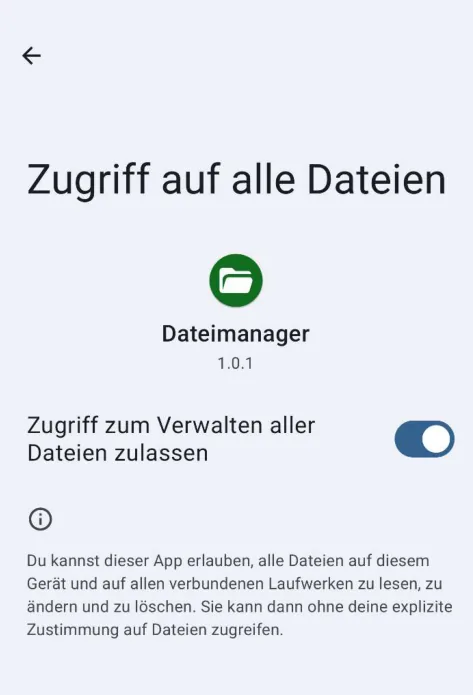
- Special permissions: Permissions in this group protect access to resources that are classified as riskier than those protected by runtime permissions. Granting them requires more effort from the user than is the case with runtime permissions. For a user to allow an application to use a special permission, the user must switch to the settings application and grant the permission to the application manually. These include, for example, the ability to grant an application device administrator capabilities, unrestricted access to all files in the user’s directory ( MANAGE_EXTERNAL_STORAGE ) or access to all notifications, including those from other applications ( BIND_NOTIFICATION_LISTENER_SERVICE ). An example of the user interface for granting such a permission is shown in Figure 3.
- Signature permissions: These permissions are only granted if the application requesting the permission is signed with the same certificate as the application that defines the permission. This enables secure data exchange and cooperation between applications of the same developer or manufacturer.
- System permissions (privileged permissions): These permissions are used by the operating system or by system applications and are not accessible to normal applications. They provide access to system resources and functions and are intended for security-critical operations. These include, for example, the ability to change system settings ( WRITE_SETTINGS ) or to obtain access rights to unique identifiers ( READ_PRIVILEGED_PHONE_STATE ).
The type of a permission is determined by the protectionLevel set in the definition of the permission [10].
4. Literature
In [11], the early Android permission system in version 2.2 is examined, in which permissions still had to be granted at installation time. As part of the study, more than 900 applications were examined for their use of permissions. It turned out that about one third of the applications requested more permissions than necessary. The authors attributed this mainly to missing or imprecise developer documentation. In [12], the change of the Android permission system is traced over several years. In particular, the aim was to answer the question of whether the permission system is being changed in a way that strengthens the security of the system. According to the study, the number of permissions increased in the period considered. However, the increase was not due to a finer division of permissions but to the introduction of new functions, in particular new hardware functions. As a result, the number of permissions classified as “dangerous” in particular increased. The study also examined applications for their use of permissions. As in the previous study, it was found that applications request more permissions than are necessary for their execution. It was also shown that applications tend to require more and more permissions in the course of updates. The study covers the period up to 2012, that is, a period before the introduction of the runtime permission system with Android 6.0.
In a more recent study by Zhauniarovich and Gadyatskaya [13], the changes brought about by the runtime permission system were examined. It was found that, in the course of the changeover, many of the permissions formerly classified as “dangerous” are now classified as normal and thus require no explicit consent from the user. Since the changeover, some signature permissions are also available to third-party applications. To keep the number of prompts to the user for granting permissions low, the remaining permissions classified as “dangerous” were combined into permission groups. As a result, however, experienced users do not have the option of granting permissions at a finer level. In [14], the security of the runtime permission system is evaluated. It was found that, by deliberately imitating trusted applications, the user could be deceived into granting permissions. Likewise, some permissions can be bypassed by deliberately exploiting authorised applications via intents. The study also argues that the division of permissions into groups is not fine enough for comprehensive control. In a study from 2020, Almomani and Khayer [15] found that the number of permissions has continued to increase; in some permission categories there are up to seven times as many permissions as in earlier versions. Applications were also examined across several versions. Here too, it turned out that a large number of applications requested more permissions across the versions.
5. Conclusion
This report examined the permission system of Android. It has been continuously developed over the years. While early versions of Android used a static model, the runtime permission system introduced with Android 6.0 allows the user to grant many permissions to individual applications individually or to deny them. In addition, temporary permissions allow permissions to be granted for individual uses, which gives the user greater control. As the permission system is regarded as a central element in the security architecture of Android, there are also extensive studies on the permission system in the literature.
References
Z. Fang, W. Han und Y. Li, „Permission based Android security: Issues and countermeasures,“ Computers & Security, pp. 205-218, 2014.
A. P. Felt, E. Chin, S. Hanna, D. Song und D. A. Wagner, „Android permissions demystified,“ Proceedings of the 18th ACM Conference on Computer and Communications, pp. 627-638, 2011.
Android Developers, „Permissions on Android - Types of permissions,“ Google Inc, 2024. [Online]. Available: https://developer.android.com/guide/topics/permissions/overview#normal-dangerous. [Zugriff am 14 08 2024].
Android Developers, „Settings.Secure - ANDROID_ID,“ Google Inc, 2024. [Online]. Available: https://developer.android.com/reference/android/provider/Settings.Secure.html#ANDROID_ID/. [Zugriff am 19 07 2024].
Android Developers, „Privacy Changes in Android 10 - Restriction on non-resettable device identifiers,“ Google Inc, 2019. [Online]. Available: https://developer.android.com/about/versions/10/privacy/changes#non-resettable-device-ids/. [Zugriff am 07 02 2024].
Google Inc, „Play Console Help - Advertising ID,“ 2024. [Online]. Available: https://support.google.com/googleplay/android-developer/answer/6048248. [Zugriff am 23 07 2024].
Apple Developer, „iOS 7.0 Release Notes (Documentation Archive),“ Apple Inc, 2013. [Online]. Available: https://developer.apple.com/library/archive/releasenotes/General/RN-iOSSDK-7.0/index.html. [Zugriff am 26 07 2024].
Apple Developer, „Deprecated UIDevice Methods (Archived Version),“ Apple Inc, 2014. [Online]. Available: https://web.archive.org/web/20140703160701/https://developer.apple.com/library/ios/documentati on/UIKit/Reference/UIDevice_Class/DeprecationAppendix/AppendixADeprecatedAPI.html. [Zugriff am 19 07 2024].
R. Mayrhofer, J. V. Stoep, C. Brubaker, D. Hackborn, B. Bonné, G. S. Tuncay, R. P. Jover und M. Specter, „The Android Platform Security Model (2023),“ in Google Inc, https://research.google/pubs/theandroid-platform-security-model-2023/, 2023.
Android Developers, „<permission> - android:protectionLevel,“ Google Inc, 03 10 2023. [Online]. Available: https://developer.android.com/guide/topics/manifest/permission-element. [Zugriff am 14 08 2024].
A. P. Felt, E. Chin, S. Hanna, D. Song und D. Wagner, „Android permissions demystified,“ Proceedings of the 18th ACM conference on Computer and communications security (CCS), pp. 627-638, 2011.
X. Wei, L. Gomez, I. Neamtiu und M. Faloutsos, „Permission evolution in the Android ecosystem,“ Proceedings of the 28th Annual Computer Security Applications Conference (ACSAC), pp. 31-40, 2012.
„Small Changes, Big Changes: An Updated View on the Android Permission System,“ Research in Attacks, Intrusions, and Defenses, pp. 346-367, 07 09 2016.
„Unravelling Security Issues of Runtime Permissions in Android,“ Journal of Hardware and Systems Security, pp. 45-63, 25 10 2018.
I. M. Almomani und A. A. Khayer, „A Comprehensive Analysis of the Android Permissions System,“ IEEE Access, pp. 216671-216688, 30 11 2020.